This is the advanced companion to How HDDs Work. Unlike the basics article aimed at “understanding concepts,” this one stands in the shoes of a database kernel engineer: you are not writing “how to read/write a file,” but a buffer pool, WAL, B-Tree, checkpoint, and crash recovery — all of whose correctness rests on precise assumptions about disk behavior. Everywhere an incorrect assumption causes data corruption or lost transactions, we go deep.
Zero: Why a DB kernel must understand HDDs
Nearly every performance and correctness decision in a database kernel ultimately reduces to “what actually happens on this disk IO”:
- Correctness: After
fsync(), is the transaction truly safe? If power is lost mid-write of an 8KB page, can half of it land on disk (torn page)? - Performance: Why is a B-Tree random read hundreds of times slower than a sequential scan? Why must WAL be sequential?
- Reliability: Why do consumer “shingled” drives periodically freeze as a database disk? Why does a drive get dropped during RAID rebuild?
Answer these wrong and the cleverest upper-layer algorithm is built on sand. Let’s dissect layer by layer.
One: Physical construction — why random access is expensive
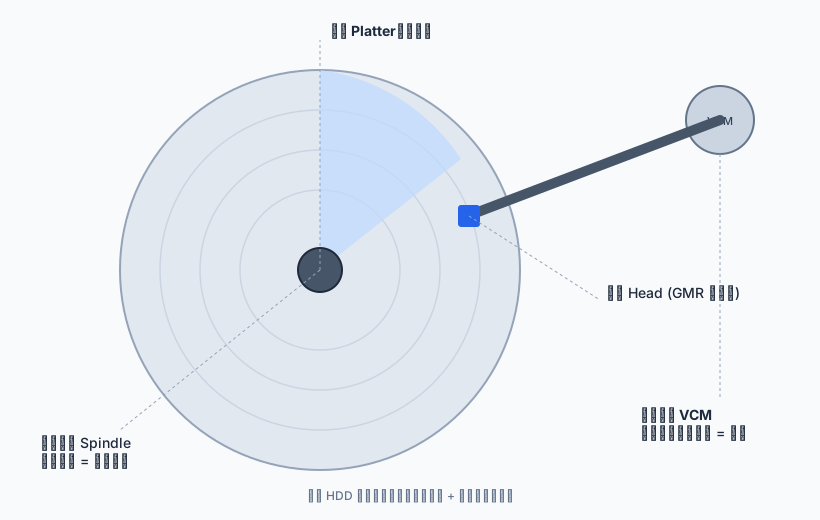
Core components of an HDD:
┌─────────────────────────────────────────────┐
│  Spindle motor  7200/10k/15k RPM constant    │
│   ┌───────────────────────────┐             │
│   │  Platter ×N (magnetically coated) │ ← concentric tracks │
│   └───────────────────────────┘             │
│   ┌───────────────────────────┐             │
│   │  actuator arm               │             │
│   │    └ Head (GMR sensor)      │ ← radial swing │
│   │      driven by VCM          │             │
│   └───────────────────────────┘             │
└─────────────────────────────────────────────┘- Track: a concentric circle on a platter; Cylinder: tracks at the same radius across platters (switching heads is faster than moving the arm).
- Sector: an arc segment of a track, the minimum read/write unit.
- The head is a giant-magnetoresistive (GMR) sensor, floating nanometers above the platter, reading analog voltage from remnant magnetization.
Random access is expensive because of mechanics: moving the head (seek) + spinning the platter (rotational latency) each cost milliseconds, while data transfer itself is under 0.1ms. This is the starting point for all later optimizations (sequentialization, prefetch, buffer pool).
Two: Addressing model — LBA, CHS, and sector size (alignment is the foundation)
2.1 LBA → physical translation
The OS and database see only sequentially numbered Logical Block Addresses (LBA). The controller translates them to physical Cylinder/Head/Sector (CHS) before driving the hardware:
Logical world                  Physical world
┌──────────┐                ┌──────────────────────┐
│ LBA 2048 │  firmware →     │  cyl k / head h / sector s │
└──────────┘                └──────────────────────┘
Modern drives use Zone Bit Recording: outer tracks are longer and hold more sectors, so “LBA→physical” is done by an internal zone map. The key fact for databases: adjacent LBAs are physically adjacent — the root reason sequential IO is fast and random IO is slow.
2.2 Sector size: 512n / 512e / 4Kn (a DB kernel must know this)
This is the most overlooked yet most impactful low-level detail.
| Type | Logical sector | Physical sector | Notes |
|---|---|---|---|
| 512n | 512B | 512B | Traditional, no translation overhead |
| 512e | 512B | 4KiB | Emulation mode, most common |
| 4Kn | 4KiB | 4KiB | Native 4K, needs OS/driver support |
- 512e RMW amplification: the physical sector is 4KiB but the drive exposes 512B logical blocks. When you write an unaligned 4KiB (spanning two physical sectors) or a sub-4KiB block, the drive must first read → modify → write back the whole 4KiB physical sector (read-modify-write). One logical write becomes a read plus a write; latency and write amplification double.
- Alignment: the filesystem/partition/LVM must be 4KiB aligned, and the database page (typically 8KiB) must also start on a 4KiB boundary, or every page write can trigger RMW.
- Atomic write unit: the drive guarantees “a physical sector (4KiB) is either fully written or not at all.” But a database page is often 8KiB, spanning two 4KiB physical sectors. If power is lost right after the first sector is written but before the second — you get a torn page: half new data, half old, logically inconsistent. This is exactly why WAL uses full-page write (before-image of the whole page) — crash recovery overwrites the corrupted page with the WAL image.
Kernel-dev rule: never assume a “page write” is atomic. Use page checksums to detect torn/silent corruption, use WAL full-page writes to rebuild on recovery, and require 4KiB alignment at the storage layer to avoid 512e RMW.
Three: A random read — end to end
The full path of a random read, from command to return (at 7200 RPM):
flowchart TD
    subgraph H0["① Host ↔ Controller"]
        A["Host: READ LBA n, length"]
        B["Controller: LBA → CHS (Cyl/Head/Sector)"]
    end
    subgraph M0["② Mechanical motion — main cost of random reads (ms)"]
        C["Voice-coil seek: move head to target track<br/>Seek 3–15 ms"]
        D["Servo tracking: lock onto track center"]
        E["Rotational wait: sector spins under head<br/>Rotational Latency ≈ 4.2 ms @7200RPM"]
    end
    subgraph S0["③ Read-channel signal processing (µs)"]
        F["Head senses flux change → analog voltage"]
        G["Preamp + PRML read channel: analog to digital bits"]
        H["ECC decode + verify"]
    end
    subgraph R0["④ Return (transfer < 0.1 ms)"]
        I["Into drive cache, back to host via SATA/SAS"]
        J["Data returned"]
    end
    A --> B --> C --> D --> E --> F --> G --> H --> I --> J

    classDef host fill:#e7f5ff,stroke:#1c7ed6,color:#103a5c;
    classDef mech fill:#fde2e1,stroke:#e03131,color:#7a1416;
    classDef sig fill:#e6fcf5,stroke:#0ca678,color:#0a4f3c;
    classDef back fill:#fff3bf,stroke:#f08c00,color:#7a4b00;
    class A,B host;
    class C,D,E mech;
    class F,G,H sig;
    class I,J back;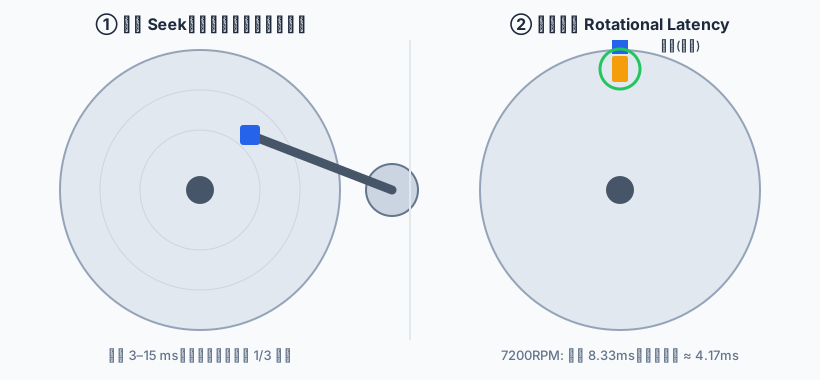
The sequence diagram below shows the host/controller/platter collaboration:
sequenceDiagram
    participant H as "Host"
    participant C as "Controller"
    participant P as "Platter"
    H->>C: READ LBA n, length
    C->>C: LBA → Cyl/Head/Sector
    C->>P: Seek + rotational wait
    P-->>C: flux change → analog voltage
    C->>C: PRML decode + ECC verify
    C-->>H: data returned via SATA/SAS
3.1 Seek — the most expensive step
The head sits on an arm driven by a Voice Coil Motor (VCM); current produces a Lorentz force swinging it radially — a classic closed loop:
Target position ──┐
                  │  Position Error Signal (PES)
  servo logic ────┴─→ drive VCM ─→ head moves
    ▲                   │
└── read actual position from servo sector (feedback)- Full stroke seek ~8-15ms; average seek about 1/3 of full stroke.
- Seek draws power and wears mechanics — the main cost of random access.
3.2 Servo tracking
Platters embed Servo Sectors with precise position marks. The head reads two burst signals, compares amplitudes to compute the Position Error Signal (PES), and nudges the VCM to stay centered:
[data][servo][data][servo][data][servo]...   ← servo inserted between tracks
PES > 0 : right → nudge left      PES < 0 : left → nudge right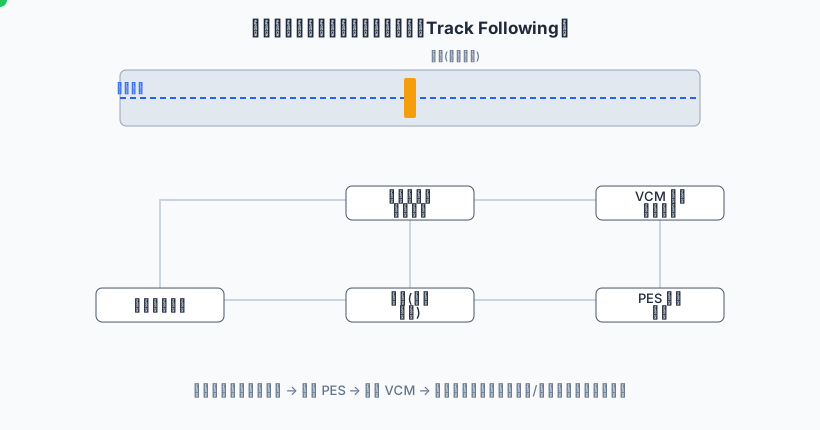
Without servo, the head drifts off-track from vibration/thermal expansion — the root of why drives fear shock.
3.3 Rotational latency
7200 RPM → 120 rev/s → 8.33ms/rev → avg rotational latency ≈ 4.17ms
15000 RPM → 4ms/rev    → avg rotational latency ≈ 2ms
3.4 Readout: from magnetic field to bits (PRML)
The head outputs a faint analog voltage, then preamp, variable gain, low-pass, ADC sampling, into the PRML (Partial Response Maximum Likelihood) channel:
flux reversal → induced voltage → preamp → VGA+LPF → ADC → PRML equalizer
   → Viterbi maximum-likelihood decode → bit stream → ECC correction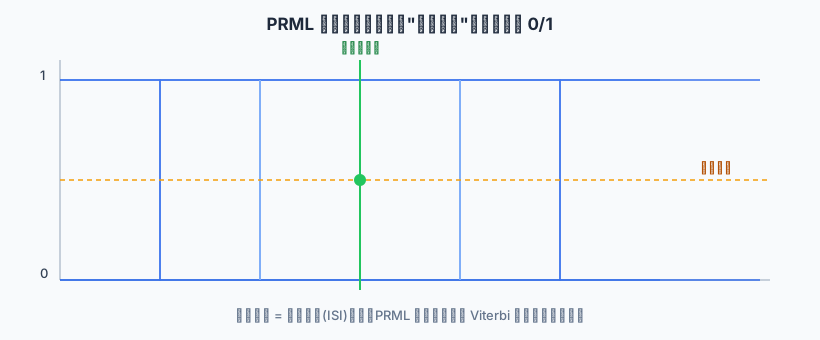
At high density, adjacent bit pulses interfere (inter-symbol interference). PRML doesn’t decide 0/1 per sample; it feeds the whole sampled sequence to a Viterbi decoder that, under a known channel model, finds the bit sequence most likely to have produced that waveform — a key enabler of rising capacity. Modern drives use LDPC codes correcting multiple bits.
3.5 Sector internals
┌────────┬────────┬──────────┬──────────┬─────┐
│ Preamble│ Sync  │ User data│  ECC/CRC │ Gap │
└────────┴────────┴──────────┴──────────┴─────┘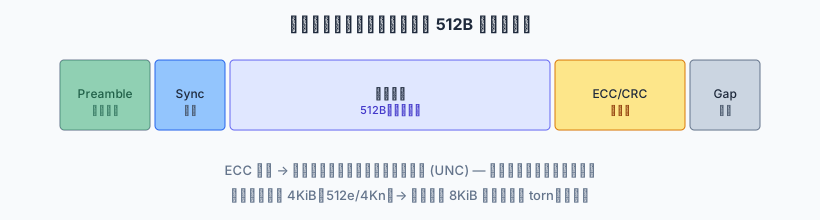
On ECC failure the controller retries; repeated failure reports a media error (UNC) — an occasional read failure source for databases.
Four: A write — the full path and fsync semantics (the core for DB kernels)
The first steps (seek, rotational wait) match reads; the difference is “putting data on the medium”:
flowchart TD
    A["Host: WRITE LBA n, data"] --> B["Controller: LBA to physical location"]
    B --> C["Seek + rotational wait"]
    C --> D["Write current magnetizes medium: coil field flips remnant magnetization"]
    D --> E["Encode bits: flux-reversal polarity = 0/1"]
    E --> F["Append ECC + preamble/sync"]
    F --> G["Read-after-write verify"]
    G --> H["Report done, or rewrite/remap bad block"]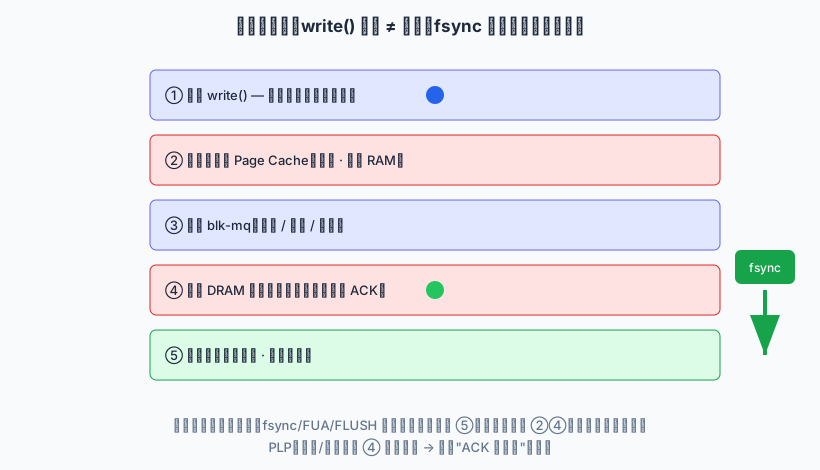
The sequence diagram below contrasts a plain write() with an fsync()-forced flush:
sequenceDiagram
    participant App as "App"
    participant PC as "Page cache (volatile)"
    participant BL as "Block layer"
    participant DC as "Drive cache (volatile)"
    participant PL as "Platter (non-volatile)"
    App->>PC: write() copies, returns
    Note over PC,DC: writeback thread flushes async
    PC->>BL: WRITE
    BL->>DC: ACK as soon as in cache
    App->>PC: fsync()
    PC->>BL: force flush dirty pages
    BL->>DC: FLUSH CACHE / FUA
    DC->>PL: truly on platter
    PL-->>App: durable commit
But what a DB kernel truly must understand is which volatile caches sit between a write() call and data that genuinely cannot be lost — the whole truth of durability semantics.
4.1 The full hierarchy a write traverses
Application process
  │ write()  ← only copies data into the kernel page cache, returns immediately!
  ▼
Kernel Page Cache (volatile, host RAM)
  │ flushed asynchronously by pdflush/writeback (dirty-page timeout / threshold)
  ▼
Block Layer (blk-mq)  ← IO scheduling, merging, reordering
  │ issues SCSI/SATA command (WRITE)
  ▼
Drive DRAM write cache (volatile!)  ← ACK as soon as data enters cache, flushed later
  │ flushed to platter by firmware
  ▼
Platter medium (non-volatile, truly durable)
Key point: write() returning ≠ data on disk. It only entered the host’s page cache. True durability must pass: page cache flushed by writeback → block layer → drive DRAM cache (still volatile) → platter. Power loss at any layer can lose data.
4.2 What fsync actually does
fsync(fd) must pierce two volatile caches to be durable:
- Flush host page cache: force the file’s dirty pages back to the block layer (bypassing async writeback).
- Flush drive DRAM cache: issue a FLUSH CACHE command (or use FUA — Force Unit Access on that write, bypassing the drive cache and ACKing only after platter write).
Only both happen is a transaction commit durable. If the drive cache is volatile and fsync didn’t issue FLUSH/FUA, the “committed transaction” lives only in the drive’s RAM — lost on power loss, and WAL can’t save it because the WAL record itself never reached the platter.
4.3 Write barriers and ordering
“On disk” isn’t enough; ordering matters: the WAL commit record must hit the platter before the data page, or a crash may show “data changed but WAL not logged.” Early kernels used a write barrier to enforce this; under modern blk-mq, journaling filesystems/databases use explicit flush + FUA instead. A DB kernel must realize: the ordering your fsync relies on is ultimately provided by the ordering guarantee of the underlying flush commands.
4.4 Non-volatile cache (PLP) — when “ACK means durable” holds
What it is
PLP (Power-Loss Protection) is a hardware safety net on enterprise HDDs / RAID cards / enterprise SSDs: a capacitor (or supercapacitor / battery) is mounted on the board, driven by dedicated firmware. The capacitor stays charged and on standby — the energy it stores is reserved for exactly one thing: the “final flush” after a power loss.
The sequence is: the moment external power disappears, the drive detects the loss → it switches to capacitor-backed power → within the few-tens-of-milliseconds window the capacitor sustains, the firmware force-flushes the DRAM write cache (still not on the medium) to non-volatile media (the platter for HDDs, NAND for SSDs) → only after the data is safe does power fully vanish.
sequenceDiagram
    participant P as "External power"
    participant C as "Capacitor (PLP)"
    participant D as "DRAM write cache (volatile)"
    participant M as "Non-volatile media (platter/NAND)"
    P->>C: Stays charged/on standby during normal operation
    P--xP: Power lost!
    C->>D: Capacitor takes over (tens of ms window)
    D->>M: Firmware force-flushes cached data
    M-->>C: Data safe, power can drop
What problem it solves
On ordinary consumer HDDs the DRAM write cache is volatile: with write-back mode on, a write is ACKed as soon as it enters the cache, and only later flushed to the medium asynchronously. In that state fsync() only guarantees the data “entered the drive cache” — not that it reached the platter. If power is lost in that window, everything in the cache evaporates: the transaction already reported “committed” to the client, yet was actually lost — a direct violation of ACID’s D (durability).
So on drives without PLP, a production database must either disable the volatile write cache (write-through, every write hits the platter directly — a big throughput hit) or force every write through with FUA / write-through. With PLP, the write-back cache becomes “safe”: the capacitor force-flushes the cache on power loss, so the database can keep the cache on for high throughput while still guaranteeing already-ACKed data is not lost. This is precisely why enterprise drives can sustain OLTP IOPS.
Kernel-dev rule: the necessary-and-sufficient condition for a durable commit = critical writes truly reach the platter via FUA/write-through or a PLP non-volatile cache + flush ordering + an
fsync()that genuinely forces the flush. WAL provides crash-replay capability, not a substitute for low-level persistence — don’t treat WAL as a power-loss fuse.
4.5 Practice: how to detect whether a drive has PLP
PLP has no single standard probe bit, but in production you can quickly tell whether a drive actually has power-loss protection with a few commands:
# 1) Kernel view: is the drive write cache write_back (on) or write_through?
cat /sys/block/sda/queue/write_cache

# 2) Most enterprise drives self-report PLP status in SMART (Seagate Exos / WD Gold / etc.)
smartctl -a /dev/sda | grep -i "power loss"
#   hit example:  Power Loss Protection: Enabled

# 3) SAS/SCSI: check whether write cache is on (WCE bit)
sdparm --get=WCE /dev/sda

# 4) NVMe: check the Volatile Write Cache bit (vwc); PLP is usually reported by vendor tools/SMART
nvme id-ctrl /dev/nvme0 | grep -i vwc
How to read it:
write_cache = write_backand PLP confirmed → safe to keep the cache on, getting both high performance and “ACK means durable”.write_cache = write_backbut no PLP found (the norm for consumer drives) → treat as volatile; production DBs must use FUA/write-through, or disable the cache explicitly:hdparm -W0 /dev/sda # SATA consumer drive: disable write cache sdparm --set=WCE=0 /dev/sda # SAS/SCSI drive: disable write cachewrite_cache = write_through→ already write-through; every write hits the medium directly — safe but slow.
Rule of thumb: when in doubt, assume no PLP. On a drive you cannot 100% confirm has capacitor backup, running a database, it is better to sacrifice a little write performance and disable the volatile write cache than to expose “committed transactions” to power-loss loss.
Five: SMR — the hidden landmine for database engineers
Many “database disk mysteriously freezes periodically” cases are caused by SMR (Shingled Magnetic Recording).
5.1 Principle
To raise density, SMR overlaps adjacent tracks like roof shingles: writing one track destroys downstream tracks’ data, so all downstream tracks must be rewritten together.
Plain PMR:  ┌──┐┌──┐┌──┐┌──┐   tracks independent, random-write OK
            track0 track1 track2 track3

SMR shingle: ┌────┐
           ┌────┐│
         ┌────┐││   writing track1 forces rewrite of track2, track3... (RMW storm)
The disk is divided into zones; within a zone you can only write sequentially, and modifying any spot triggers RMW of everything downstream — latency jumps from milliseconds to hundreds of milliseconds or seconds.
5.2 Two SMR types and their DB impact
| Type | Management | Database risk |
|---|---|---|
| DM-SMR (drive-managed) | firmware does RMW silently, transparent to host | Most dangerous: random writes silently trigger RMW, unpredictable tail-latency explosions |
| HA-SMR (host-managed) | FS/app must write per-zone sequentially, explicit reset | If the DB doesn’t understand zones, writes fail on full; needs special adaptation |
WAL is sequential append, so SMR tolerates it in theory; but checkpoint, background dirty flush, Compaction, VACUUM — operations that rewrite random-ish locations — trigger RMW storms, causing periodic write stalls and extreme tail latency.
5.3 Identify and avoid
- Use
smartctl -ion the model, check the vendor’s SMR label (common in high-capacity cold-storage and some desktop drives). - Never use consumer SMR drives for production databases; choose CMR/PMR enterprise or nearline drives.
Six: NCQ, queue depth, and IO scheduling (throughput vs latency)
6.1 NCQ reordering
NCQ (Native Command Queuing) lets the host issue up to 32 IOs at once; firmware reorders so the head serves them along the shortest one-way path, reducing back-and-forth:
Host issues:  read track 100 → 50 → 200 → 30
NCQ reorders: 30 → 50 → 100 → 200   ← head sweeps one direction
6.2 Queue depth: deeper isn’t better
- Too shallow: gaps between IOs can’t be filled by other IOs; throughput suffers.
- Too deep: many IOs queue inside the drive, each IO’s latency stretches (throughput up, latency explodes). OLTP wants low latency; blindly raising queue depth sacrifices tail latency.
6.3 Linux block-layer schedulers (blk-mq)
none          : no scheduling, submit directly (good for NVMe; suboptimal for HDD)
mq-deadline   : guarantees request deadlines, the safe HDD default for random/mixed
kyber         : latency-target dynamic throttling, good for mixed loads
bfq           : desktop/fairness scheduling, generally not for database servers
DB-kernel view: on HDD use mq-deadline (balance throughput and latency bound); pure large sequential IO can use none; NVMe defaults to none. The scheduler affects whether random IOs get merged/reordered, directly impacting seek count.
Seven: Latency, IOPS, throughput, and tail latency
7.1 Breakdown formula
random read latency ≈ seek(8ms) + rotation(4.2ms) + transfer(<0.1ms) + ctrl/protocol
                   ≈ 12.25ms
random read IOPS ≈ 1 / 0.01225 ≈ 80 IOPS
Versus SSD random read of tens of thousands to millions of IOPS — three orders of magnitude apart.
7.2 Averages lie: tail latency and queuing
What databases fear isn’t the 12ms average but p99.9 possibly reaching hundreds of ms. The cause is queuing: as arrival rate λ approaches service rate μ, wait time follows the M/M/1 intuition W = 1/(μ−λ) and rises non-linearly. HDD’s μ is low (~80 IOPS); a little concurrency and the queue jams. This is the root reason HDD is unfit for low-latency OLTP — not that a single op is slow, but that it avalanches under load.
Eight: Error handling and data integrity
- UNC (Uncorrectable Error): sector ECC fails, read returns an error. At the DB layer this surfaces as an occasional read failure — guard with page checksum to detect at memory/flush time, replicas / RAID as backstop.
- ERC / TLER (Error Recovery Control): enterprise firmware caps error recovery at a short window (e.g., 7s) then reports up; consumer drives may retry for tens of seconds. In RAID, a consumer drive’s long “no response” gets misjudged as dropped, triggering a rebuild storm — use enterprise drives with ERC for database servers.
- End-to-end protection (DIX/DIF): adds protection info at the SCSI layer to catch “correct on disk but corrupted in transit,” optional in enterprise storage.
Nine: Device-level read/write amplification (hidden write cost)
| Source | Amplification | DB impact |
|---|---|---|
| 512e misalignment | sub-4KiB / cross-boundary writes trigger RMW | write latency doubles |
| SMR shingling | random writes trigger whole-zone RMW | tail-latency explosion |
| small-write rounding | writes smaller than a sector rounded up | write amplification |
| WAL + data double-write | same modification written to WAL then data page | logical amplification (necessary cost) |
Ten: Synthesis — implications for the database kernel
| HDD trait | Database-kernel response |
|---|---|
| Seek/rotation dominate, random is slow | Buffer pool turns random reads into memory hits; B-Tree indexes cut disk accesses |
| Adjacent LBA physically adjacent | Clustered/heap-organized tables, primary-key-order writes reduce head swing |
| Sequential write is fast | WAL sequential append; bulk COPY; avoid random small writes |
| 512e misalignment RMW | 4KiB alignment across the whole stack; pages start on 4KiB boundaries |
| Writes non-atomic / torn page | WAL full-page write + page checksum to detect and recover |
| Drive cache power-loss volatile | FUA/write-through or PLP non-volatile cache + fsync() truly forces flush + flush ordering |
| SMR random-write RMW | Ban consumer SMR in production; use CMR enterprise drives |
| NCQ reordering | Moderate concurrent IO lifts throughput; control queue depth for low latency |
| Low μ + queuing avalanche | HDD only for large/sequential/offline loads; SSD for OLTP low-latency needs |
| Media/silent corruption | page checksum, replicas, RAID; enterprise drives enable ERC |
In one sentence: every database-kernel optimization for HDD stems from two facts — mechanical access is extremely slow and non-atomic, and “write returned” by default guarantees no durability. Get these clear and you can explain why early databases treated “avoid random disk access” as paramount, and why WAL, buffer pools, clustering, indexes, and checkpoints look the way they do; and even on SSD, the intuitions “sequential beats random” and “writes must be explicitly flushed” still hold — just at a hundredth of the cost.
References
- Hard Disk Drive: Mechatronics and Control, Abdullah Al Mamun
- Wikipedia: Hard Disk Drive
- Wikipedia: PRML
- Wikipedia: NCQ
- Wikipedia: Shingled magnetic recording
- Wikipedia: Advanced Format (512e/4Kn)