SMP
In the early days of computing, most computers had a single chip on the motherboard called a microprocessor or single-core CPU. These processors communicated with the other components on the board through a connector or socket. Having processors talk to each other over the system bus was highly inefficient and frequently created performance bottlenecks, preventing the CPU’s compute power from being used to its full potential.
To improve this situation, multi-core technology was born. Multi-core duplicates some CPU units onto the same processor—such as registers or the L1 cache—so that two execution threads can share data. This accelerates the processing of multiple processes and delivers higher overall performance than a traditional single core (with multi-core disabled).
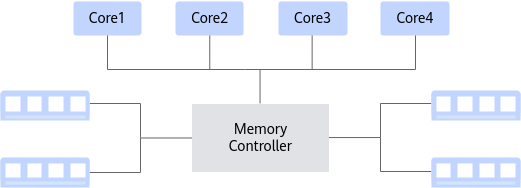
SMP (Symmetric Multi-Processing) is a symmetric multiprocessor architecture. Every processor has equal status and the same permissions to access memory. Any program, process, or thread can be scheduled onto any processor. With operating-system support this achieves excellent load balancing and noticeably improves the system’s overall performance and throughput. However, because all cores share the same bus to access memory, memory-access contention grows rapidly as the core count increases, and the bus becomes the bottleneck that limits scalability and performance.
NUMA
Because the centralized shared-memory design of SMP limits how frequently processors can access memory, processors may often starve waiting for data. To address this problem better, the NUMA architecture was introduced.
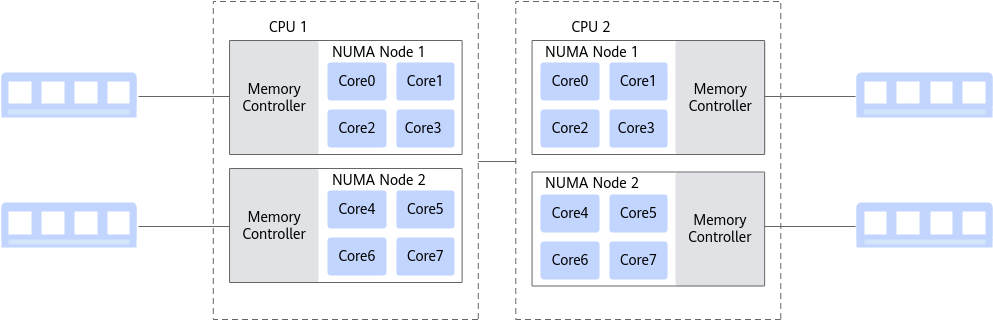
In a NUMA architecture, multiple cores are grouped into a node. Each node is effectively a symmetric multiprocessor (SMP): nodes within a single CPU communicate over an on-chip network, while different CPUs use a Hydra Interface to achieve high-bandwidth, low-latency inter-chip communication. Under NUMA, the entire memory space is physically distributed; the union of all memory is the system’s global memory. The time a core takes to access memory depends on where that memory sits relative to the processor—accessing local memory (within the same node) is faster. The Linux kernel has supported NUMA since version 2.5, and modern operating systems provide rich tools and interfaces to help us optimize and configure memory-access locality.
Affinity and Core Pinning
Affinity is the tendency of a process to keep running on a given CPU for as long as possible instead of being migrated to another processor. On a multi-core machine, each CPU has its own cache holding information the process uses; if the OS schedules the process onto a different CPU, the CPU cache hit rate drops. Once a process is pinned to a CPU, it keeps running on that designated CPU and the OS will not reschedule it elsewhere. This greatly improves the CPU cache hit rate and thus performance.
Using shell commands to bind a running task to a NUMA node and CPU.
numactl is a manual tuning command provided by Linux; it can make a process run on a specific NUMA node or on specific CPU cores.
You can first inspect NUMA node information and the topology with numactl -H.
- Bind NUMA node:
numactl --cpubind=0 --membind=0 - Bind CPU cores:
numactl -C 0-19 --membind=0 - Verify the pinning: the
topcommand can also show which CPU is assigned to which process.
Binding via system API calls in application code.
Using the sched_getaffinity interface from glibc, we can read the application’s current CPU affinity; with sched_setaffinity we can bind the application to run on a fixed set of one or more CPUs.
The interface is defined as follows:
#include <sched.h>
int sched_setaffinity(pid_t pid, unsigned int cpusetsize, cpu_set_t *mask);
int sched_getaffinity(pid_t pid, unsigned int cpusetsize, cpu_set_t *mask);
void CPU_CLR(int cpu, cpu_set_t *set);
int CPU_ISSET(int cpu, cpu_set_t *set);
void CPU_SET(int cpu, cpu_set_t *set);
void CPU_ZERO(cpu_set_t *set);
Example:
#include <sched.h>
#include <stdio.h>
// Bind the current process to CPU0
cpu_set_t cpu_mask;
CPU_ZERO(&cpu_mask);    // Clear the set so all bits are 0
CPU_SET(0, &cpu_mask); // Mark CPU0 as schedulable
if (sched_setaffinity(0, sizeof(cpu_mask), &cpu_mask) == -1) {
    perror("sched_setaffinity failed");
} else {
    // Bind succeeded
}Kunpeng Programming & Tuning Guide: Multi-core & NUMA Non-Uniform Memory Access