Tencent Cloud Database Redis Overview
Product edition: only the in-memory edition is supported.
Product architecture: two architecture editions are offered—Standard and Cluster—with a maximum storage capacity of 16 TB.
Read/write split: you can enable or disable read/write splitting. For read-heavy, write-light workloads it addresses concentrated read demand on hot data. It supports up to a 1-master-5-replica topology, delivering up to 5× read throughput.
The in-memory edition (Standard architecture) supports 1–9 replicas; when the replica count is ≥ 1 you can enable read/write splitting and scale read throughput via the replicas. The in-memory Redis (Cluster architecture) supports horizontal scaling from 1 to 128 shards and 1 to 9 replicas; scaling up/down and spec changes are nearly imperceptible to the business, ensuring maximum service availability.
The Standard edition supports specs from 0.25 GB to 64 GB; choose the Cluster edition for larger capacities.
Standard architecture: supports one or more replicas and is the most general-purpose Redis edition.
Cluster architecture: a brand-new edition built on the community Redis Cluster, using a distributed architecture that supports scaling shards and replicas in/out.
Architecture upgrade: Redis offers an upgrade from the Standard architecture to the Cluster architecture, to meet the need to move to Cluster when the Standard architecture runs out of performance or capacity.
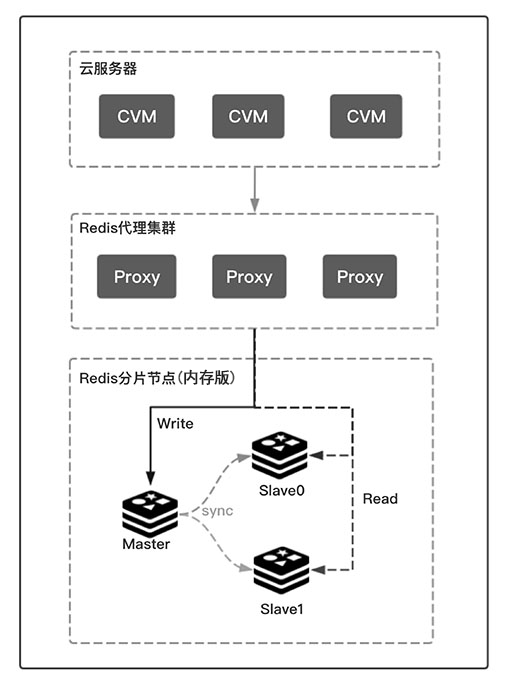
Read/Write Splitting: automatic read/write splitting is implemented at the Proxy layer. The Proxy keeps writes on the master only, while read requests are automatically load-balanced across the configured read-only nodes.
Multi-AZ deployment: the master and replica nodes of an instance are deployed in different availability zones within the same region—a disaster-recovery architecture with higher availability.
Automatic disaster recovery: a dual-machine hot-standby architecture is used; after the primary host fails, access switches to the standby host within seconds.
RDB persistence: the cloud database background service periodically creates snapshots of the data held in the storage engine according to a backup policy, generates RDB files, and saves them to disk to achieve data persistence.
Architecture
The Redis engine delivers a pure, native Redis experience and supports diverse use cases. Whether deployed as Standard or Cluster, it adapts flexibly to different business needs.
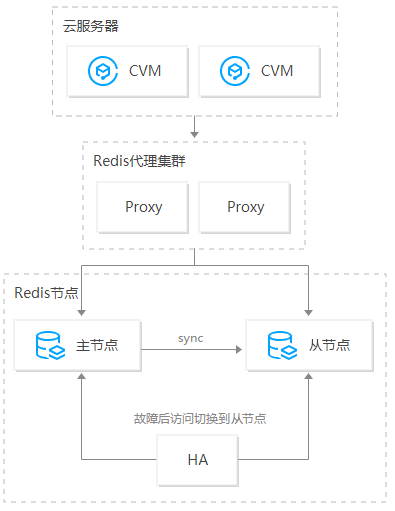
- Standard architecture: when the replica count is greater than 0, the master (Master) and replica (Slave) nodes sync data in real time. If the master fails, the system switches over automatically within seconds and the replica takes over—fully automatic and transparent to the business. The master-replica architecture guarantees high availability, with specs from 0.25 GB to 64 GB.
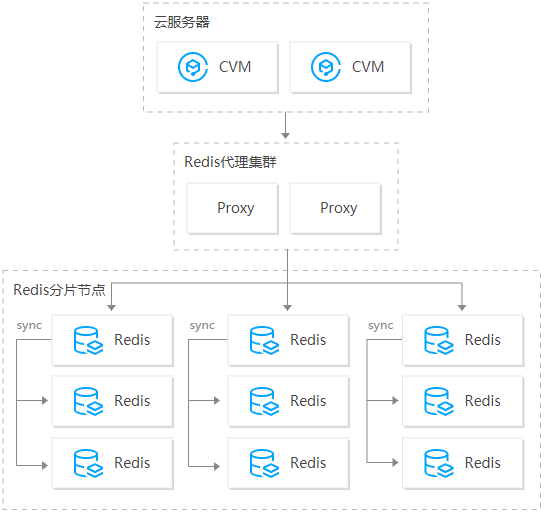
- Cluster architecture: Cluster instances use a distributed architecture, letting you flexibly choose the shard count, shard capacity, and replica count, and providing business-transparent scale-up/scale-down with specs from 2 GB to 8 TB and tens of millions of QPS.
When the replica count equals 1, Redis provides real-time master-replica hot standby (within the same AZ, across servers, for high availability). Once the HA system detects a node failure, it routes requests to the replica and adds a new replica to the system.
The Proxy Layer
When using the Cluster architecture or read/write splitting of Tencent Cloud Redis, the proxy server (Proxy) plays a critical role, handling routing, load balancing, and automatic failover.
Forwarding rules
- Basic forwarding rules:
- Cluster architecture
- Commands operating on a single key: each key usually lives on one shard, so the Proxy sends the request directly to the slot owning that key.
- When an operation involves multiple keys on different shards, the Proxy splits the command into sub-commands (each touching one key) and sends each key to its respective shard.
- Read/write splitting
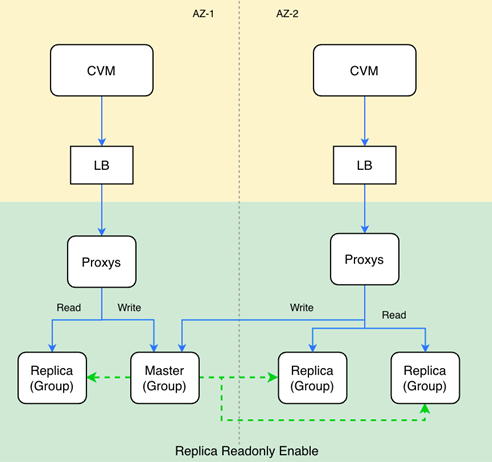
- Write requests: all data changes must happen on the master, so the Proxy forwards them directly to the master (Master).
- Read requests: the Proxy dynamically adjusts weights based on each replica’s real performance and current load, balancing reads across replicas. Customizing specific nodes is not yet supported.
- Cluster architecture
- Special command forwarding rules
- The Proxy forwards transaction commands (MULTI or EXEC), Lua script commands (EVAL or EVALSHA), SCAN, INFO, and pub/sub commands (PUBLISH, SUBSCRIBE, etc.) to the master.
Multi-AZ Deployment
Tencent Cloud Redis supports deploying replicas across multiple AZs within the same region. Compared with a single-AZ instance (master and replica in the same AZ), a multi-AZ instance offers higher availability and disaster-recovery capability.
- Single AZ: host- and rack-level disaster recovery.
- Multi-AZ: host-, rack-, and AZ-level disaster recovery.
Deployment architecture:
Architecture notes:
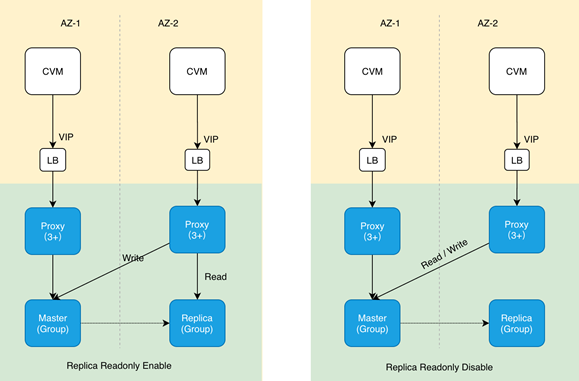
- LB (load balancer): both the Standard and Cluster architectures have a Proxy, and the Proxy count is ≥ 3, so an LB is needed to balance access.
- VIP: a multi-AZ instance has a single VIP reachable across the whole Region; Redis HA does not change the VIP.
- Proxy: the access proxy service that implements request routing and distributes user data requests.
- Master: the primary node.
- Replica: the replica (secondary) node.
- Primary AZ: the AZ where the master resides. Unless changed manually in the console, the primary AZ stays fixed. If the master fails it may switch to a replica’s AZ—this is temporary; the HA system migrates the master back to the primary AZ within minutes when conditions allow. The migration is lossless unless your workload uses blocking commands such as BLPOP or BLPUSH.
Failover mechanism: the Redis Standard and Cluster architectures use the native Redis Cluster management mechanism, relying on the Gossip protocol between nodes to judge node status. The timeliness of failure detection depends on the cluster-node-timeout parameter (default 15s); it is recommended not to change it. See Redis Cluster for failure detection details.
Master election: compared with the native Cluster Failover mechanism, Tencent Cloud Redis introduces primary-AZ-priority switching logic to protect access latency for the primary AZ:
- The node with the freshest data is preferred for election.
- If data is equal, the replica in the primary AZ is preferred.
Cross-AZ access:
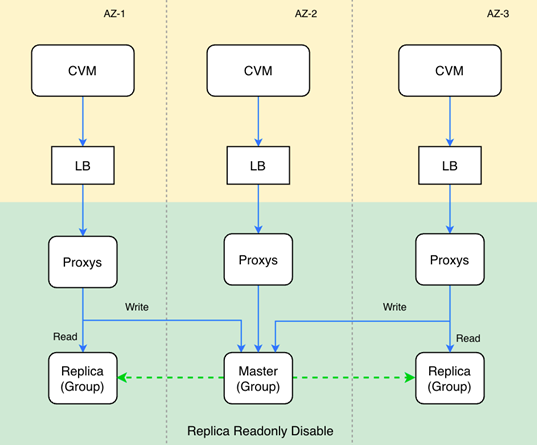
- For instances without replica-read enabled, all read and write requests are routed through the local AZ’s Proxy to the master, guaranteeing consistency and at most one AZ crossing.
- For instances with replica-read enabled (read/write splitting), writes go to the master and reads go to the local AZ’s replicas, satisfying the就近 (nearby) access requirement.
Cross-AZ access incurs a 2–5 ms latency.
Deployment Recommendations
Two-AZ deployment: 1 master + 3 replicas across two AZs—1 master + 1 replica in the primary AZ, the standby AZ acts as load balancer, two nodes per AZ. This guarantees that a single-machine failure does not send reads across AZs, and a single-AZ failure still preserves master-replica high availability. Suitable for scenarios with high availability and low-latency requirements.
Three-AZ deployment: 1 master + 2 replicas across three AZs—one node per AZ. A single-host or single-AZ failure can still provide cross-AZ master-replica high availability. Suitable for scenarios insensitive to latency but with extremely high availability requirements.
Region refers to the geographic area of a physical data center. Networks between different regions are fully isolated, and cloud products in different regions cannot communicate over the private network by default.
Availability Zone (AZ): physically independent data centers within the same region with independent power and network. AZs are interconnected over the private network with lower intra-AZ latency, ensuring faults are isolated between AZs without spreading, keeping your business continuously online.
VPC (Virtual Private Cloud): a custom, logically isolated network space that lets you build logically isolated, user-configured network spaces for resources such as CVMs and cloud databases, improving the security of your cloud resources and meeting different scenario needs.
Upgrades
Upgrading the instance version:
- Upgrades from lower to higher versions are supported; downgrading the compatible version is not.
- Cross-version upgrades are supported.
- Minor-version upgrades are auto-detected by the system; the target version cannot be customized.
Upgrade flow:
- Resource application: apply for new-version instance resources, including Proxy resources and Redis master/replica node resources.
- Data sync: sync full and incremental data from the lower-version instance to the new-version instance.
- Wait for switch: wait for data sync to complete, or wait for the switch time window.
- Version switch: once the switch condition is met (data sync nearly complete and within the switch window), the user stops writes to the old instance, unbinds the VIP from the old instance, and binds it to the new instance.
- Upgrade complete: update the instance state.
Upgrade impact: the version upgrade mainly consists of data sync and instance switch:
- During data sync, the service is unaffected.
- During the instance switch, the instance is read-only for up to 1 minute (waiting for data sync) and experiences a second-level connection flash-cut; the business must have an auto-reconnect mechanism.
Existing connections drop (flash-cut) during the upgrade, so the business must have a reconnect mechanism.
Upgrade notes:
- Cross-version architecture upgrades are not supported.
- Downgrading from Cluster to Standard architecture is not supported.
- Cross-AZ architecture upgrades are not yet supported.
Proxy upgrade: the data switch causes a second-level connection flash-cut and up to 1 minute of read-only state (for data sync); ensure your business code has auto-reconnect capability.
Backup and Recovery
Periodic scheduled backups are supported, as well as on-demand backups at any time, producing RDB-format backup files that are durably stored.
Data backup:
- Automatic backup: to avoid burdening the primary, backup data comes from a replica node.
- Manual backup