Introducing RedisShake
An open-source Redis migration tool by Alibaba, released under the MIT license. It can also be used for backup and restore scenarios. It supports migrating data across versions and across topologies — for example, migrating data from a standalone Redis instance into a Redis Cluster. However, since Redis is generally used as a cache, real-world data migration scenarios are not that common.
GitHub: https://github.com/tair-opensource/RedisShake.git
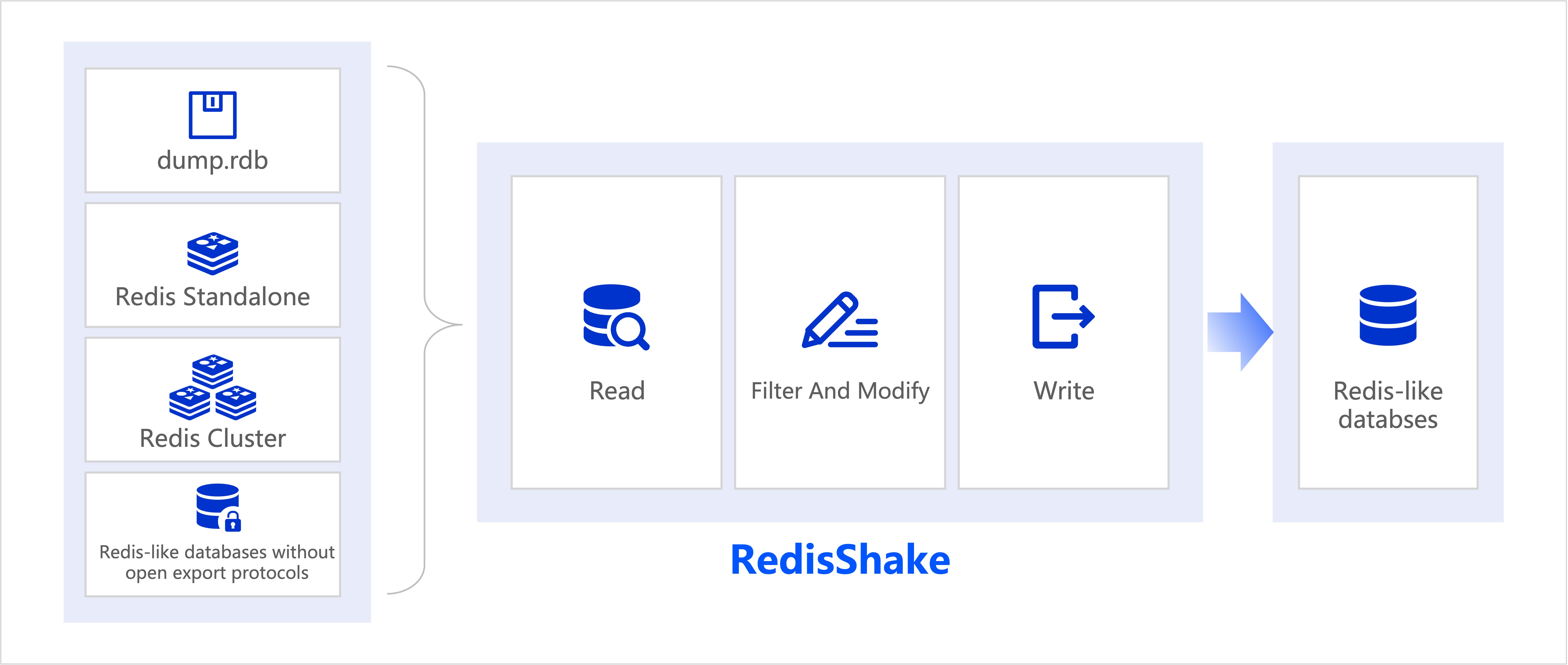
Usage Example
The usage is very simple: configure the shake.toml file and run redis-shake shake.toml.
postgres@slpc:~/redisshake$ ./redis-shake shake.toml
2026-03-05 11:02:50 INF load config from file: shake.toml
2026-03-05 11:02:50 INF log_level: [info], log_file: [/home/postgres/redisshake/data/shake.log]
2026-03-05 11:02:50 INF changed work dir. dir=[/home/postgres/redisshake/data]
2026-03-05 11:02:50 INF GOMAXPROCS defaults to the value of runtime.NumCPU [8]
2026-03-05 11:02:50 INF not set pprof port
2026-03-05 11:02:50 INF create SyncClusterReader
2026-03-05 11:02:50 INF * address (should be the address of one node in the Redis cluster): 192.168.232.128:6379
2026-03-05 11:02:50 INF * username: admin
2026-03-05 11:02:50 INF * password: **************
2026-03-05 11:02:50 INF * tls: false
2026-03-05 11:02:50 INF address=192.168.232.128:6379, reply=ca62daac7e5028e18f65def8a3ffdfb519c7be63 192.168.232.138:6379@16379 master - 0 1772679768763 3 connected 10923-16383
831e4c891d2025233320461e4b6aa3ea3e9c3c97 192.168.232.128:6379@16379 myself,master - 0 1772679768000 1 connected 0-5460
e0856d63d6a1170c0755f74782ba828be23e8fc2 192.168.232.137:6379@16379 master - 0 1772679769768 2 connected 5461-10922
2026-03-05 11:02:50 INF NewFileWriter absolute path=[/home/postgres/redisshake/cmd.dump],type=[cmd]
2026-03-05 11:02:50 INF start syncing...
2026-03-05 11:02:50 INF [reader_192.168.232.138_6379] source db is not doing bgsave! continue.
2026-03-05 11:02:50 INF [reader_192.168.232.128_6379] source db is not doing bgsave! continue.
2026-03-05 11:02:50 INF [reader_192.168.232.137_6379] source db is not doing bgsave! continue.
2026-03-05 11:03:00 INF read_count=[0], read_ops=[0.00], write_count=[0], write_ops=[0.00], src-2, waiting bgsave
2026-03-05 11:03:05 INF read_count=[0], read_ops=[0.00], write_count=[0], write_ops=[0.00], src-0, waiting bgsave
2026-03-05 11:03:10 INF read_count=[0], read_ops=[0.00], write_count=[0], write_ops=[0.00], src-1, waiting bgsave
2026-03-05 11:03:15 INF read_count=[0], read_ops=[0.00], write_count=[0], write_ops=[0.00], src-2, receiving rdb, size=[654 MiB/2.0 GiB]
2026-03-05 11:03:20 INF read_count=[0], read_ops=[0.00], write_count=[0], write_ops=[0.00], src-0, receiving rdb, size=[1000 MiB/2.0 GiB]
2026-03-05 11:03:25 INF read_count=[0], read_ops=[0.00], write_count=[0], write_ops=[0.00], src-1, receiving rdb, size=[1.6 GiB/2.0 GiB]
2026-03-05 11:03:30 INF read_count=[206046], read_ops=[41209.00], write_count=[206046], write_ops=[41209.00], src-2, receiving rdb, size=[1.8 GiB/2.0 GiB]
2026-03-05 11:03:35 INF read_count=[831945], read_ops=[125182.55], write_count=[831942], write_ops=[125182.15], src-0, syncing rdb, size=[158 MiB/2.0 GiB]
2026-03-05 11:03:40 INF read_count=[1664476], read_ops=[166505.37], write_count=[1664473], write_ops=[166505.37], src-1, syncing rdb, size=[759 MiB/2.0 GiB]
2026-03-05 11:03:45 INF read_count=[2577500], read_ops=[182606.22], write_count=[2577497], write_ops=[182606.22], src-2, syncing rdb, size=[662 MiB/2.0 GiB]
2026-03-05 11:03:50 INF read_count=[3303362], read_ops=[145171.40], write_count=[3303359], write_ops=[145171.40], src-0, syncing rdb, size=[974 MiB/2.0 GiB]
2026-03-05 11:03:55 INF read_count=[3955934], read_ops=[130507.06], write_count=[3955931], write_ops=[130507.06], src-1, syncing rdb, size=[1.5 GiB/2.0 GiB]
2026-03-05 11:04:00 INF read_count=[4609175], read_ops=[130650.84], write_count=[4609172], write_ops=[130650.84], src-2, syncing rdb, size=[1.3 GiB/2.0 GiB]
2026-03-05 11:04:05 INF read_count=[5269922], read_ops=[132155.14], write_count=[5269919], write_ops=[132155.14], src-0, syncing rdb, size=[1.6 GiB/2.0 GiB]
2026-03-05 11:04:10 INF read_count=[5946592], read_ops=[135333.63], write_count=[5946590], write_ops=[135333.83], src-1, syncing rdb, size=[2.0 GiB/2.0 GiB]
2026-03-05 11:04:11 INF all done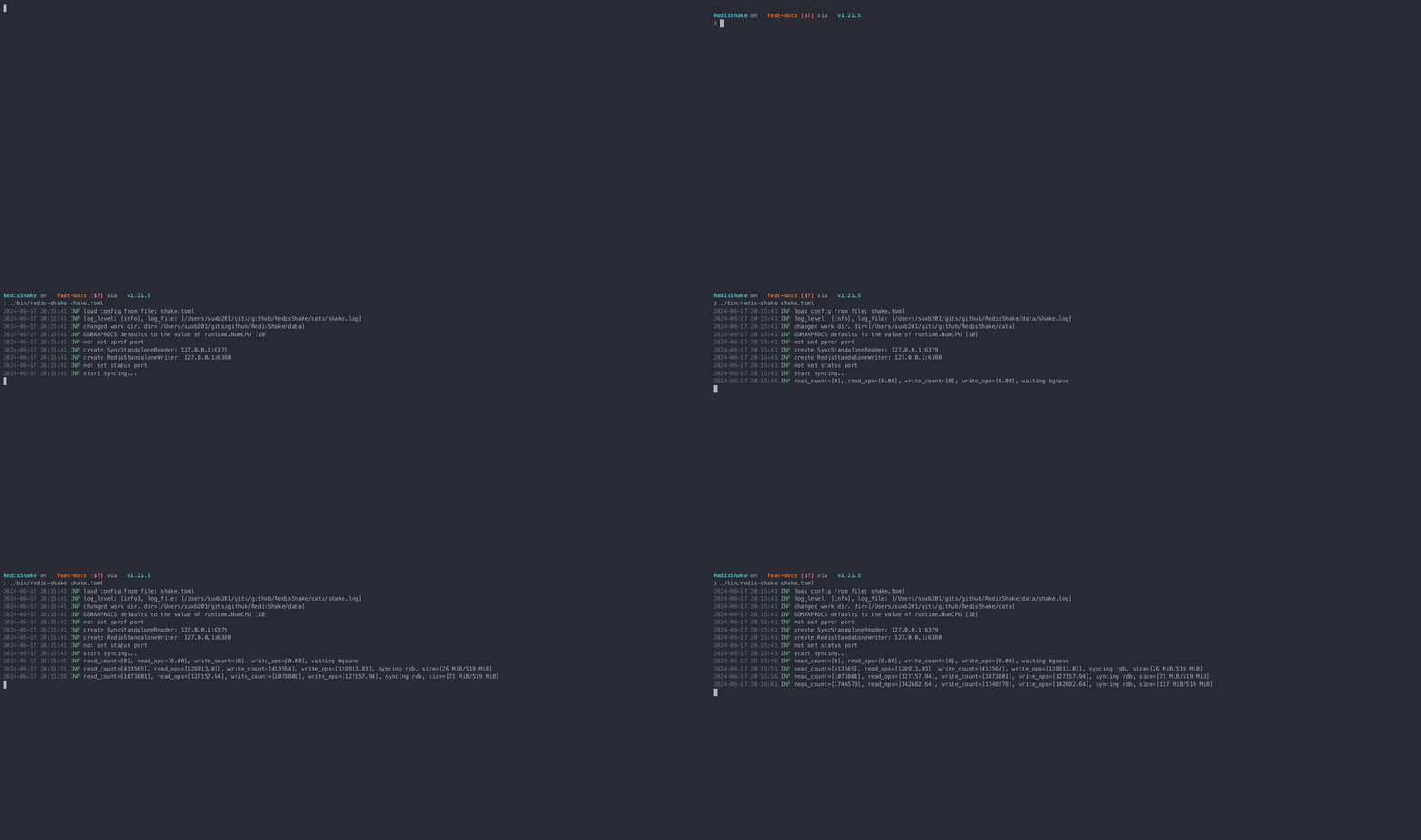
Source Readers
Read data from the source via the sync method, i.e. through the PSYNC protocol — similar to attaching as a replica to obtain the source node’s data (rdb + aof).
[sync_reader]
cluster = true            # Set to true if the source is a Redis cluster
address = "192.168.232.128:6379" # For clusters, specify the address of any cluster node; use the master or replica address in master-replica mode
username = "admin"              # Keep empty if ACL is not in use
password = "admin_password"     # Keep empty if no authentication is required
tls = false                     # Set to true to enable TLS if needed
sync_rdb = true                 # Set to false if RDB synchronization is not required
sync_aof = false                # Set to false if AOF synchronization is not required
prefer_replica = false          # Set to true to sync from a replica node
try_diskless = false            # Set to true for diskless sync if the source has repl-diskless-sync=yes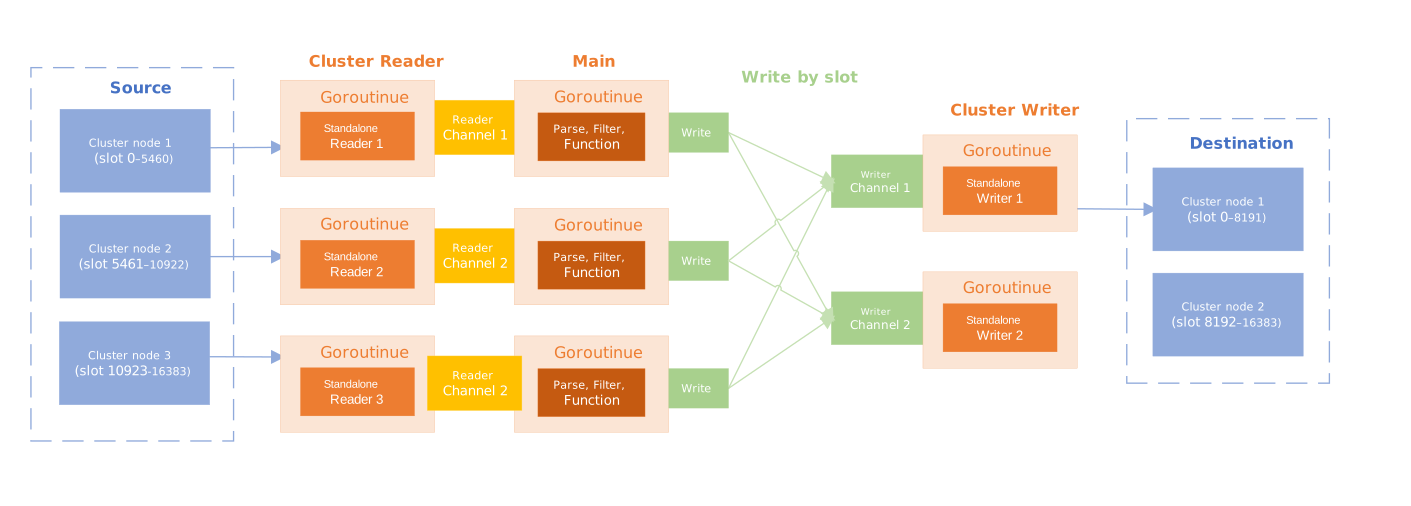
Read data from the source via the SCAN method — continuously fetching keys via the SCAN command, effectively scanning all keys on the source node.
[scan_reader]
cluster = false            # set to true if source is a redis cluster
address = "127.0.0.1:6379" # when cluster is true, set address to one of the cluster nodes
username = ""              # keep empty if not using ACL
password = ""              # keep empty if no authentication is required
tls = false
dbs = []                   # set the dbs you want to scan, e.g. [1,5,7]; leave empty to scan all
scan = true                # set to false if you don't want to scan keys
ksn = false                # set to true to enable Redis keyspace notifications (KSN) subscription
count = 1                  # number of keys to scan per iteration
## RedisShake uses the TYPE command to get each key's type.
## If the type is in this skip list, the key will be skipped.
skip_unknown_type = []  # e.g. ["imset", "mbloom", "string", "hash", "list", "set", "zset"]
Read a data snapshot via the rdb method.
[rdb_reader]
filepath = "/tmp/dump.rdb"
Read data from the source via the aof method.
[aof_reader]
aoffilepath="/tmp/appendonly.aof.manifest" # or a single aof file "/tmp/appendonly.aof"
aoftimestamp="0"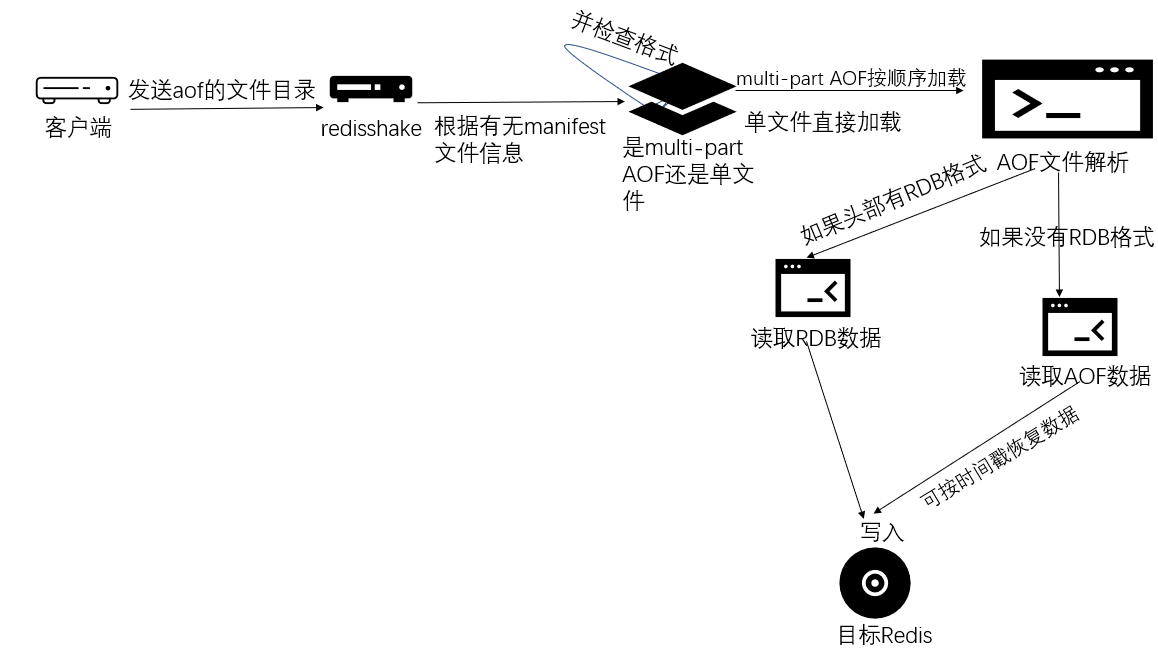
Destination Writers
Where does the data collected from the source get written? redis-shake supports writing to Redis or to files. Note that writing to files or Redis does not use the RDB format — instead it replays Redis commands.
Redis Writer
redis_writer writes data into a Redis-like database. During data migration it writes into the target database; during restore it writes data back into Redis.
Configuration
[redis_writer]
cluster = false
address = "127.0.0.1:6379" # when cluster is true, address is one of the cluster nodes
username = ""              # keep empty if not using ACL
password = ""              # keep empty if no authentication is required
tls = falsecluster: whether the target is a cluster.address: the connection address. When the target is a cluster,addresscan be any one of the cluster nodes.- Authentication:
- When using the ACL account system, configure
usernameandpassword. - When using the legacy account system, configure only
password. - When there is no authentication, do not configure
usernameandpassword.
- When using the ACL account system, configure
tls: whether to enable TLS/SSL. No certificate is required because RedisShake does not verify the server certificate.
Notes:
- When the target is a cluster, ensure the commands sent from the source satisfy the constraint that keys hash to the same slot.
- The target version should ideally be greater than or equal to the source version; otherwise unsupported commands may appear. If you really must downgrade, set
target_redis_proto_max_bulk_lento 0 to avoid using therestorecommand for data recovery.
file_writer
You can use file_writer to write to a file. Supported formats are CMD/JSON/AOF, commonly used to extract, migrate, or correct data via a file medium.
The cmd format is a command format that converts the source data into commands written to the file. Regardless of what commands were executed in between, recovery at the end can always be done by inserting keys with commands like set.
Configuration
[file_writer]
filepath = "/tmp/cmd.txt"
type = "cmd" # cmd,aof,json (default cmd)- The absolute path
filepathis required.
Use Cases
- Two systems sharing data: one system writes the file to disk/s3/oss, and the other reads from it.
- Cross-system partial migration of data with a given prefix: migrate data with the “XXX:” prefix out of system A, and system B imports it with
redis-cli --pipe XXX.aof. - Correcting data via command files: export data from one system in cmd format, correct it, then import with
redis-cli < cmd.txt. - Data analysis via json format: export to a json file and import into mongodb/bi for analysis.
Example Output
cmd_writer output:
SELECT 0
set key1 1
set key2 2
set key3 3
sadd key4 1 2 3 4
lpush key5 1 2 3 4 5
zadd key6 1 2 3 4 5 6
json_writer output:
{"DbId":0,"Argv":["SELECT","0"],"CmdName":"SELECT","Group":"CONNECTION","Keys":null,"KeyIndexes":null,"Slots":[],"SerializedSize":23}
{"DbId":0,"Argv":["set","key1","1"],"CmdName":"SET","Group":"STRING","Keys":["key1"],"KeyIndexes":[2],"Slots":[9189],"SerializedSize":30}
{"DbId":0,"Argv":["set","key2","2"],"CmdName":"SET","Group":"STRING","Keys":["key2"],"KeyIndexes":[2],"Slots":[4998],"SerializedSize":30}
{"DbId":0,"Argv":["set","key3","3"],"CmdName":"SET","Group":"STRING","Keys":["key3"],"KeyIndexes":[2],"Slots":[935],"SerializedSize":30}
{"DbId":0,"Argv":["sadd","key4","1","2","3","4"],"CmdName":"SADD","Group":"SET","Keys":["key4"],"KeyIndexes":[2],"Slots":[13120],"SerializedSize":52}
{"DbId":0,"Argv":["lpush","key5","1","2","3","4","5"],"CmdName":"LPUSH","Group":"LIST","Keys":["key5"],"KeyIndexes":[2],"Slots":[9057],"SerializedSize":60}
{"DbId":0,"Argv":["zadd","key6","1","2","3","4","5","6"],"CmdName":"ZADD","Group":"SORTED_SET","Keys":["key6"],"KeyIndexes":[2],"Slots":[4866],"SerializedSize":66}
aof_writer output:
*2
$6
SELECT
$1
0
*3
$3
set
$4
key1
$1
1