Compiling, Installing, and Using Redis
Redis is a popular open-source in-memory database, commonly used as a cache, with extremely fast read and write performance. It supports data persistence, allowing data in memory to be saved to disk. It supports the following data types: strings, hashes, lists, sets, and sorted sets.
Building and Installing
Fetch the source, compile, and install it to a directory of your choice. Build options are documented in the “Building Redis” section of the Redis source README.md.
git clone https://github.com/redis/redis.git
cd redis
# BUILD_TLS=yes enables TLS
# USE_SYSTEMD=yes turns on systemd support
make CFLAGS="-O0 -g" MALLOC=jemalloc BUILD_TLS=yes USE_SYSTEMD=yes
make install PREFIX=/home/postgres/redis   # install to a custom directory
Required dependencies:
- build-essential
- libsystemd-dev
Configure redis.conf. There are many more options available; only the most common ones are listed here:
port 6379      # listening port
dir /home/postgres/redis/data   # data directory
logfile /home/postgres/redis/redis.log  # log file
pidfile /home/postgres/redis/redis.pid  # pid file
maxmemory 2gb    # maximum memory
timeout 300      # idle timeout before a client is disconnected, in seconds
loglevel debug   # log level
databases 16     # number of databases
Start Redis with the default configuration:
postgres@slpc:~/redis$ ./bin/redis-server
60088:C 06 May 2025 17:09:50.146 * oO0OoO0OoO0Oo Redis is starting oO0OoO0OoO0Oo
60088:C 06 May 2025 17:09:50.146 * Redis version=8.0.0, bits=64, commit=e91a340e, modified=0, pid=60088, just started
60088:C 06 May 2025 17:09:50.146 # Warning: no config file specified, using the default config. In order to specify a config file use ./bin/redis-server /path/to/redis.conf
60088:M 06 May 2025 17:09:50.146 * monotonic clock: POSIX clock_gettime
                _._
           _.-``__ ''-._
      _.-``    `.  `_.  ''-._           Redis Open Source
  .-`` .-```.  ```\/    _.,_ ''-._      8.0.0 (e91a340e/0) 64 bit
 (    '      ,       .-`  | `,    )     Running in standalone mode
 |`-._`-...-` __...-.``-._|'` _.-'|     Port: 6379
 |    `-._   `._    /     _.-'    |     PID: 60088
  `-._    `-._  `-./  _.-'    _.-'
 |`-._`-._    `-.__.-'    _.-'_.-'|
 |    `-._`-._        _.-'_.-'    |           https://redis.io
  `-._    `-._`-.__.-'_.-'    _.-'
 |`-._`-._    `-.__.-'    _.-'_.-'|
 |    `-._`-._        _.-'_.-'    |
  `-._    `-._`-.__.-'_.-'    _.-'
      `-._    `-.__.-'    _.-'
          `-._        _.-'
              `-.__.-'

60088:M 06 May 2025 17:09:50.148 * Server initialized
60088:M 06 May 2025 17:09:50.148 * Ready to accept connections tcp
Start Redis with a custom configuration:
postgres@slpc:~/redis$ redis-server redis.conf   # start Redis with a custom config
postgres@slpc:~/redis$ ls
bin  data  redis.conf  redis.log  redis.pid    # after Redis starts, redis.log and redis.pid are created; data files live in the data directory
postgres@slpc:~/redis$ tail -f redis.log
60303:C 06 May 2025 17:13:50.450 * Configuration loaded
60303:M 06 May 2025 17:13:50.451 * monotonic clock: POSIX clock_gettime
60303:M 06 May 2025 17:13:50.452 * Running mode=standalone, port=6379.
60303:M 06 May 2025 17:13:50.452 * Server initialized
60303:M 06 May 2025 17:13:50.453 . The AOF directory appendonlydir doesn't exist
60303:M 06 May 2025 17:13:50.453 * Ready to accept connections tcp
Connect with the client and verify:
postgres@slpc:~/redis/bin$ redis-cli
127.0.0.1:6379> ping    # test the connection
PONG
127.0.0.1:6379> set mykey hangzhou
OK
127.0.0.1:6379> get mykey
"hangzhou"
Basic Redis Usage
The string type is the most basic type: one key maps to one value.
# string type, a key can hold up to 512MB
127.0.0.1:6379> set tianjin "shentongdb"
OK
127.0.0.1:6379> get tianjin
"shentongdb"
A hash is a collection of key-value pairs.
127.0.0.1:6379> hmset db beijing kingbasedb tianjing shentongdb wuhan damengdb
OK
127.0.0.1:6379> hgetall db  # get all fields and values for the given key in the hash
1) "beijing"
2) "kingbasedb"
3) "tianjing"
4) "shentongdb"
5) "wuhan"
6) "damengdb"

127.0.0.1:6379> hmget db beijing  # get the values of all given fields
1) "kingbasedb"
A list is a simple string list, sorted by insertion order. You can push an element to the head (left) or the tail (right) of the list.
127.0.0.1:6379> lpush database dameng   # push one or more values to the head of the list
(integer) 1
127.0.0.1:6379> lpush database kingbase
(integer) 2
127.0.0.1:6379> lrange database 0 10
1) "kingbase"
2) "dameng"
A set is an unordered collection of String elements that does not allow duplicate members. Sets are implemented with a hash table, so the complexity of add, delete, and lookup is O(1).
127.0.0.1:6379> sadd city tianjing  # add an element to the set
(integer) 1
127.0.0.1:6379> sadd city beijing
(integer) 1
127.0.0.1:6379> sadd city hangzhou
(integer) 1
127.0.0.1:6379> smembers city  # return all members of the set
1) "tianjing"
2) "beijing"
3) "hangzhou"
A Redis sorted set is, like a set, a collection of String elements that does not allow duplicate members. The difference is that each element is associated with a double-typed score. Redis uses the score to sort the members of the set from small to large. Members of a sorted set are unique, but scores may repeat. Sorted sets are implemented with a hash table, so the complexity of add, delete, and lookup is O(1).
127.0.0.1:6379> zadd mycity 1 nanjing  # add one or more members to the sorted set, or update the score of existing members
(integer) 1
127.0.0.1:6379> zadd mycity 2 guilin
(integer) 1
127.0.0.1:6379> zadd mycity 5 hangzhou
(integer) 1
127.0.0.1:6379> zadd mycity 3 qingdao
(integer) 1
127.0.0.1:6379> zadd mycity 4 tianjin
(integer) 1
127.0.0.1:6379> zrange mycity 0 10 withscores  # return members and their scores in the given range of the sorted set
 1) "nanjing"
 2) "1"
 3) "guilin"
 4) "2"
 5) "qingdao"
 6) "3"
 7) "tianjin"
 8) "4"
 9) "hangzhou"
10) "5"
Redis HyperLogLog is an algorithm for cardinality estimation. Its advantage is that the space required to compute the cardinality stays fixed and very small even when the number or volume of input elements is extremely large.
127.0.0.1:6379> pfadd base "beijing" "tianjin" "qingdao" "xian" "nanjing"
(integer) 1
127.0.0.1:6379> pfcount base
(integer) 5
Redis pub/sub is a messaging pattern: a publisher (pub) sends messages and a subscriber (sub) receives them.
127.0.0.1:6379> subscribe mychannel   # subscribe to messages
1) "subscribe"
2) "mychannel"
3) (integer) 1
1) "message"     # message received
2) "mychannel"
3) "oscar"

postgres@slpc:~/works/opensource/redis$ redis-cli  # publish a message
127.0.0.1:6379> publish mychannel "oscar"
(integer) 1
A Redis transaction executes multiple commands at once, with three important guarantees:
- Batched operations are queued in a buffer before the EXEC command is sent.
- Once the EXEC command is received, the transaction enters execution; if any command in the transaction fails, the remaining commands are still executed.
- During transaction execution, command requests submitted by other clients are not inserted into the transaction’s command sequence.
127.0.0.1:6379> multi
OK
127.0.0.1:6379> set db postgres
QUEUED
127.0.0.1:6379> get db
QUEUED
127.0.0.1:6379> exec
1) OK
2) "postgres"
Main Flow
The main Redis flow is as follows: after startup it performs some initialization work, then enters the event loop to wait for command requests.
main(int argc, char **argv)
--> spt_init(argc, argv);       // initialize the process title, i.e. the name shown by the ps command
--> zmalloc_set_oom_handler(redisOutOfMemoryHandler); // set the custom handler for out-of-memory allocation failures
--> initServerConfig();  // set Redis global default configuration parameters
--> ACLInit();   // initialize the ACL (Access Control List) subsystem
--> moduleInitModulesSystem();  // initialize the module system
--> connTypeInitialize();   // initialize connection types
--> initServer();       // server-side initialization
    --> ThreadsManager_init();
    --> createSharedObjects();
    --> adjustOpenFilesLimit();
    --> aeCreateEventLoop(server.maxclients+CONFIG_FDSET_INCR);  // initialize the event loop
        --> aeApiCreate(eventLoop)
            --> epoll_create(1024);   // create the epoll instance
    --> evictionPoolAlloc();
    --> slowlogInit();
    --> applyWatchdogPeriod();
--> ACLLoadUsersAtStartup();
--> initListeners();  // initialize network listeners and register listener events
    --> connListen(listener)   // create the listening socket
    --> createSocketAcceptHandler(listener, connAcceptHandler(listener->ct))
        --> aeCreateFileEvent(server.el, sfd->fd[j], AE_READABLE, accept_handler,sfd)
            --> aeApiAddEvent(eventLoop, fd, mask)
                --> epoll_ctl(state->epfd,op,fd,&ee)
--> InitServerLast();
--> redisSetCpuAffinity(server.server_cpulist);
--> setOOMScoreAdj(-1);
--> aeMain(server.el);
    while (!eventLoop->stop)
        aeProcessEvents(eventLoop, AE_ALL_EVENTS | AE_CALL_BEFORE_SLEEP | AE_CALL_AFTER_SLEEP);
--> aeDeleteEventLoop(server.el);
The Redis server calls the aeApiPoll function to wait for events. When an event occurs, aeApiPoll is invoked; it calls epoll_wait, which blocks the current thread until an event happens. The call stack is as follows:
aeApiPoll(aeEventLoop * eventLoop, struct timeval * tvp) (redis\src\ae_epoll.c:93)
aeProcessEvents(int flags, aeEventLoop * eventLoop) (redis\src\ae.c:398)
aeMain(aeEventLoop * eventLoop) (redis\src\ae.c:495)
main(int argc, char ** argv) (redis\src\server.c:7553)
Redis vs. PostgreSQL
Redis and PostgreSQL differ greatly in both application scenarios and technical implementation.
In terms of application scenarios, Redis’s core scenario is high-speed caching (e.g., caching database query results), while PostgreSQL’s core scenario is transactional, OLTP applications that store structured data. Although Redis can also persist data, its strength remains as a cache. Why is Redis so fast? Because it is simple: no complex query and transaction processing, no WAL log, no MVCC, no parser, and no query plan generation. Most importantly, all of its data lives in memory, so unlike PostgreSQL it does not have to fall back to disk when the buffer does not contain the data — which is obviously faster. Why can Redis keep all its data in memory? Because it was designed to be a cache; since it is a cache, losing the data is acceptable and persistence is not a primary concern. Of course Redis still supports persistence, because after a crash and restart, having persistence makes rebuilding the cache faster. That said, there are considerations beyond just this point. Compared to PostgreSQL, Redis streamlines most of the processing steps, giving it very fast read and write speeds.
In terms of features, Redis and PostgreSQL support quite different data types. Redis supports string, hash, list, set, zset, bitmap, hyperloglog, geo, etc., while PostgreSQL supports many more types such as array, JSON, JSONB, XML, UUID, HSTORE, CLOB, BLOB, and so on.
In terms of persistence, Redis is memory-first and can be configured for persistence (AOF degrades cache performance), while PostgreSQL is disk-first and supports ACID transactions.
In terms of transaction support, PostgreSQL supports full ACID transactions with isolation levels, while Redis supports simple transactions that cannot roll back and have no isolation levels.
In terms of resource consumption, Redis demands more memory because all data lives in memory and memory must be sufficient, whereas PostgreSQL demands less memory — memory is used as a cache and disk as persistent storage, so when memory is insufficient data is evicted to disk, relieving memory pressure.
A typical application scenario:
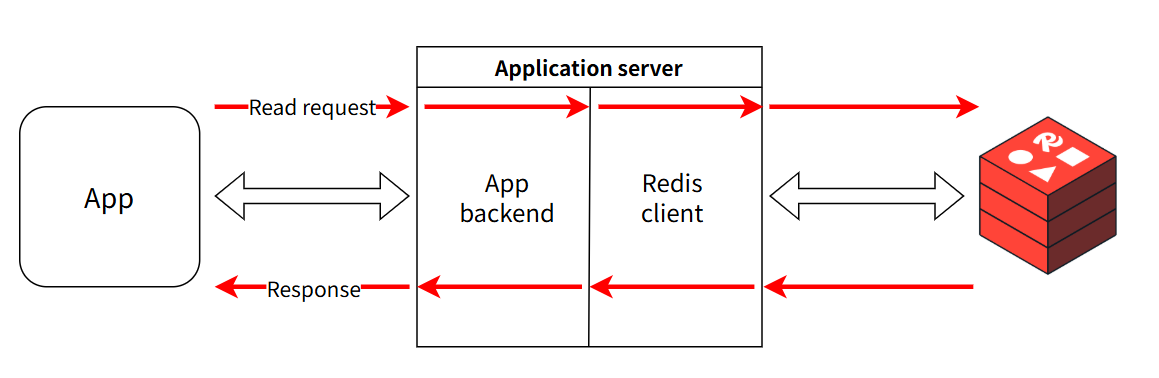
user request -> query Redis cache -> miss -> query PostgreSQL -> write result back to RedisWhy put a Redis cache in front of a PostgreSQL database? If the request volume is small and PostgreSQL’s performance is sufficient, a Redis cache is unnecessary. When request volume grows and PostgreSQL can no longer keep up, a Redis cache is needed — adding a cache layer reduces the request pressure on PostgreSQL.
As a cache, Redis’s QPS must be higher than PostgreSQL’s; otherwise the Redis cache is meaningless.
Redis Use Cases
Redis has a wide range of use cases, such as:
- Cache
- Counter
- Message queue
- Delayed queue
- Distributed lock