In a database, data is actually stored in tables; in PostgreSQL specifically, it is stored in heap tables, which form the foundation of the storage engine. Here we take apart the heap table.
Data Organization
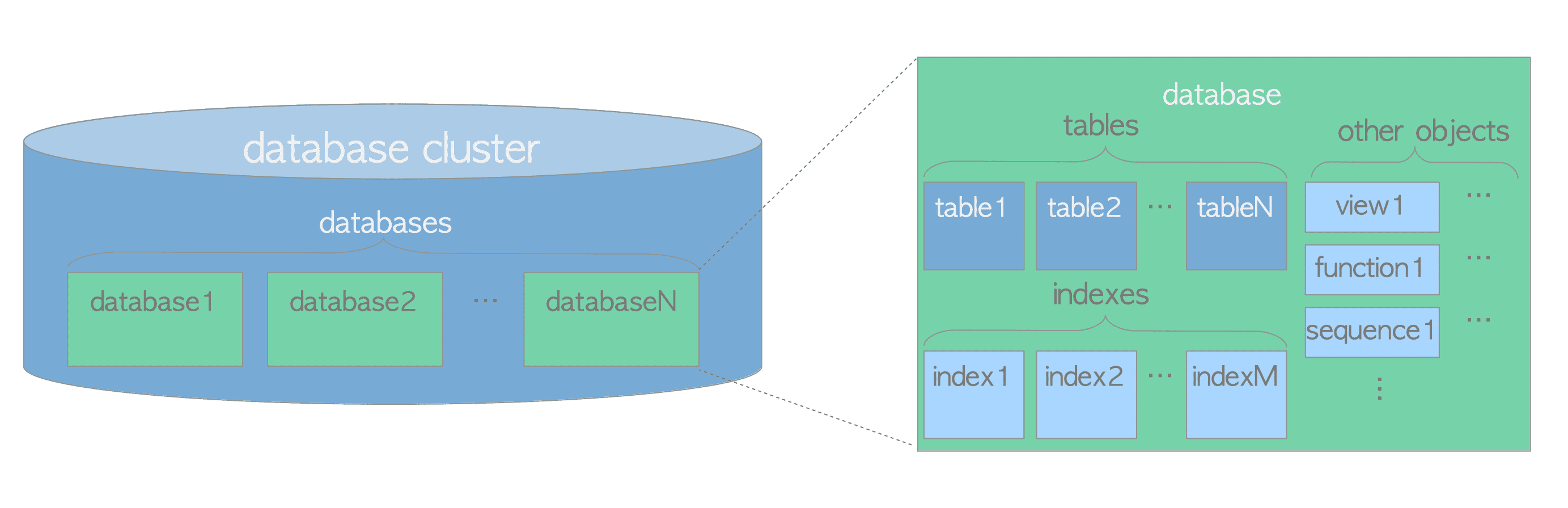
PostgreSQL’s logical data hierarchy is: database → schema → table → row data (tuple).
Physically, the storage structure is: tablespace / database / table file (segments).
typedef struct RelFileNode
{
	Oid			spcNode;		/* tablespace */
	Oid			dbNode;			/* database */
	Oid			relNode;		/* relation */
} RelFileNode;
A table is split and stored across multiple table files (segments).
Each table file (segment) is internally divided into multiple pages, 8 KB by default. Tuples are stored within pages.
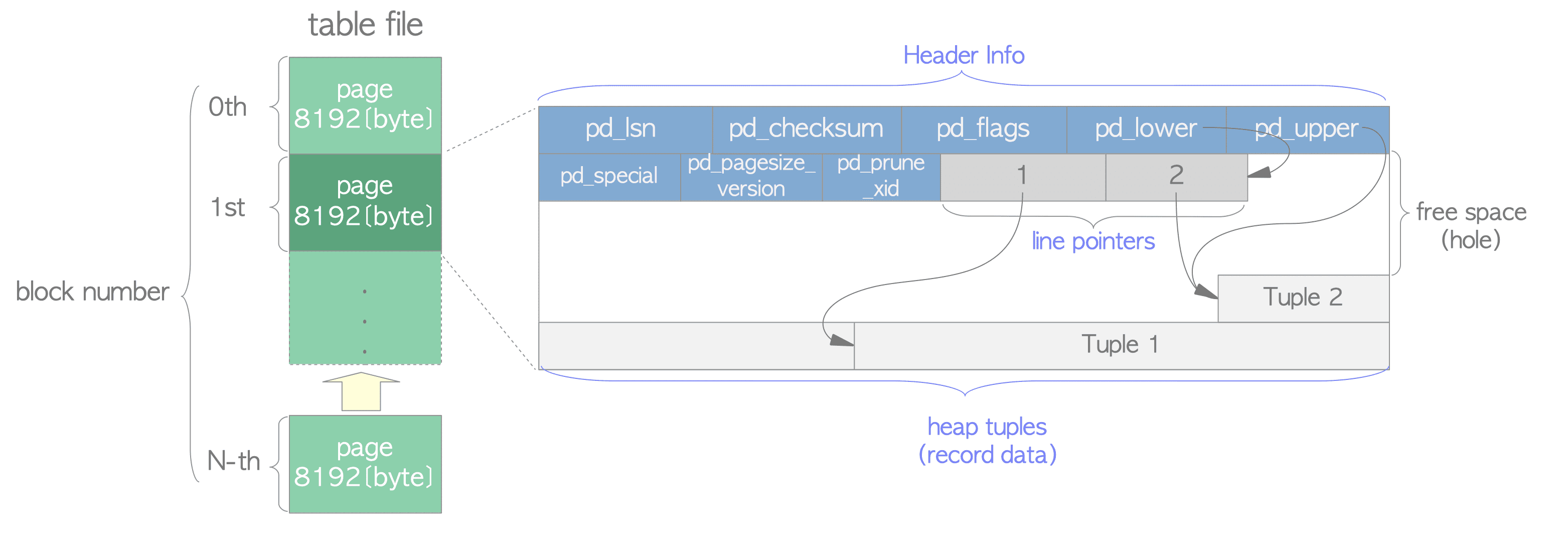
More specifically, what are the rules for splitting segments and pages?
The rule for splitting segments: a table file is split when its size exceeds 1 GB.
The 1 GB file-size limit was historically set to support various filesystems that could not handle large files. You can change the size at compile time via the build option (
./configure --with-segsize).
When a file exceeds 1 GB, it is split into multiple segments; each segment is a file no larger than 1 GB. The file name is the table’s pg_class.relfilenode value, which is an OID. If a table is split into multiple segments, the segments are named pg_class.relfilenode.x (where x is 1, 2, … n).
31069       # table relfilenode, first segment
31069.1     # second segment
31069.2     # third segment
...         # ...
Note that the table file name is pg_class.relfilenode, not pg_class.oid. When you execute something like TRUNCATE TABLE, a new relfilenode is allocated, the old file is deleted, and a new file is created.
postgres=# select pg_relation_filepath('t6');
 pg_relation_filepath
----------------------
 base/13010/30864
(1 row)
postgres=# select relname,oid,relfilenode from pg_class where relname='t6';
 relname |  oid  | relfilenode
---------+-------+-------------
 t6      | 20184 |       30864
(1 row)
postgres=# truncate table t6;
TRUNCATE TABLE
postgres=# select relname,oid,relfilenode from pg_class where relname='t6';
 relname |  oid  | relfilenode
---------+-------+-------------
 t6      | 20184 |       31093
(1 row)
postgres=# select pg_relation_filepath('t6');
 pg_relation_filepath
----------------------
 base/13010/31093
(1 row)
The rule for splitting pages: a fixed page size, 8 KB by default.
The page size can also be changed at compile time via the
--with-blocksizebuild option; the maximum is 32 KB.
Note that a “page” here is logical — it is a division within a table file, not a separate physical file.
Tablespace
A tablespace is essentially a directory in the filesystem. You can create one with the CREATE TABLESPACE command, where LOCATION specifies the directory for the tablespace. The directory must already exist (CREATE TABLESPACE will not create it), must be empty, and must be owned by the PostgreSQL system user. The directory must be specified with an absolute path.
CREATE TABLESPACE tablespace_name
    [ OWNER { new_owner | CURRENT_ROLE | CURRENT_USER | SESSION_USER } ]
    LOCATION 'directory'
    [ WITH ( tablespace_option = value [, ... ] ) ]
For example:
postgres=# create tablespace mytablespace LOCATION '/home/postgres/mytablespace';
CREATE TABLESPACE
After creating a tablespace, you can view its information in the system catalog pg_tablespace.
postgres=# select * from pg_tablespace ;
  oid  |   spcname    | spcowner | spcacl | spcoptions
-------+--------------+----------+--------+------------
  1663 | pg_default   |       10 |        |
  1664 | pg_global    |       10 |        |
 31084 | mytablespace |       10 |        |
(3 rows)
pg_default lives in the PGDATA/base directory; it is used as the default tablespace unless another one is explicitly chosen. pg_global lives in the PGDATA/global directory; it stores system catalog objects shared across the whole cluster.
You can view all tablespaces under the PGDATA/pg_tblspc directory. A tablespace directory is named pg_tblspc/<oid> by default, and when the tablespace is created, a subdirectory PG_<major_version>_<Catalogue version number> is created inside the tablespace directory.
#define TABLESPACE_VERSION_DIRECTORY	"PG_" PG_MAJORVERSION "_" \
									CppAsString2(CATALOG_VERSION_NO)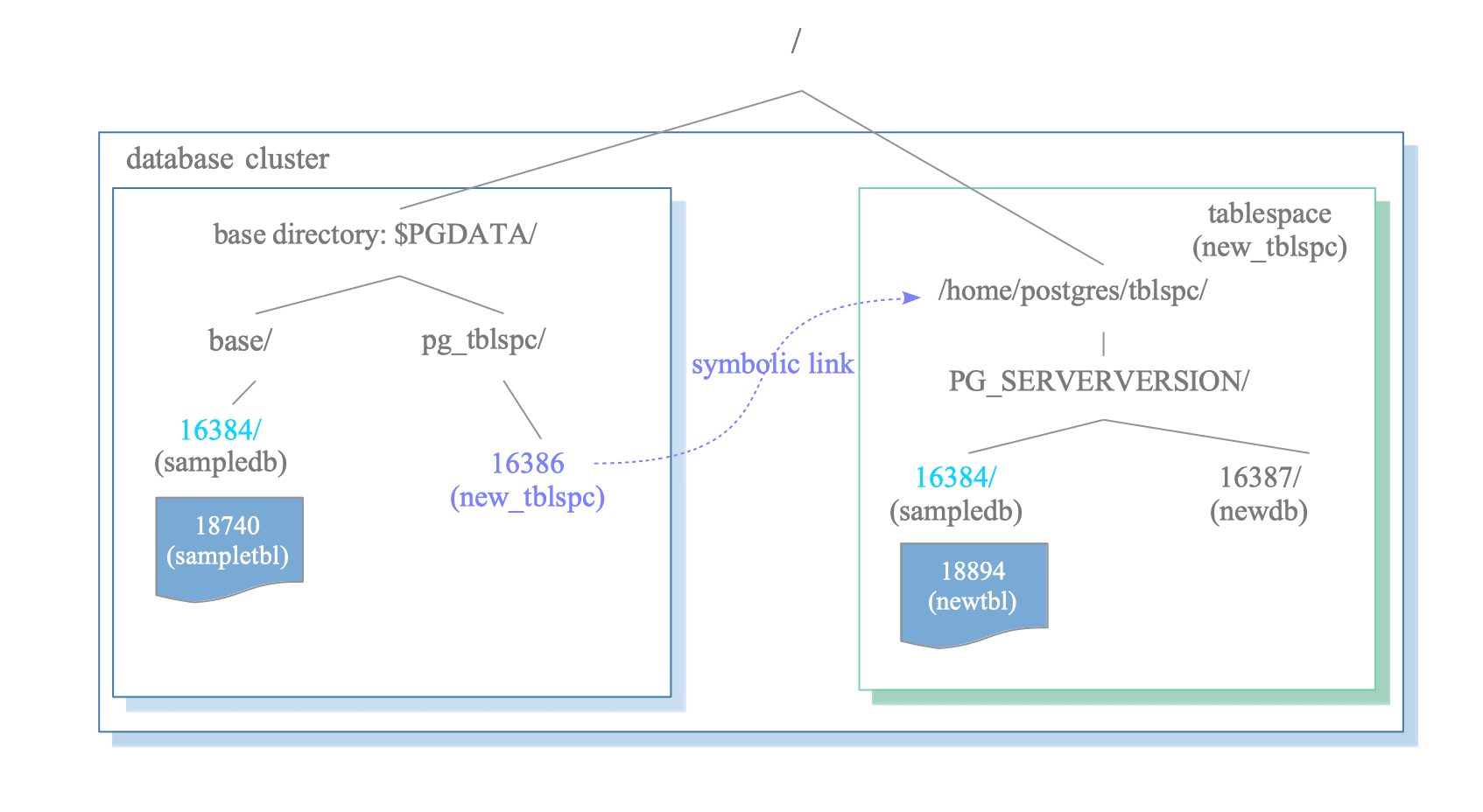
# view all tablespaces under the pg_tblspc directory
postgres@slpc:~/pgdata-14/pg_tblspc$ ls
31084
# a directory is created inside the tablespace directory: PG_<major_version>_<Catalogue version number>
postgres@slpc:~/pgdata-14/pg_tblspc/31084$ ls
PG_14_202107181
In essence, a symlink pointing to the tablespace directory is created under pg_tblspc.
postgres@slpc:~/pgdata-14/pg_tblspc$ ll
total 8
drwx------.  2 postgres postgres 4096  8月  9 06:42 ./
drwx------. 20 postgres postgres 4096  8月  9 06:31 ../
lrwxrwxrwx.  1 postgres postgres   27  8月  9 06:42 31084 -> /home/postgres/mytablespace/
All of PostgreSQL’s data is relative to the
PGDATAdirectory.
CREATE DATABASE, CREATE TABLE, and CREATE INDEX can all specify a tablespace; if none is specified, the default tablespace is used.
You can specify a tablespace when creating a database via CREATE DATABASE.
CREATE DATABASE name
    [ WITH ] [ OWNER [=] user_name ]
           [ TEMPLATE [=] template ]
           [ TABLESPACE [=] tablespace_name ]
           ...
At this point, the database is created under the tablespace directory.
-- specify a tablespace when creating a database
postgres=# create database db1 with tablespace=mytablespace;
CREATE DATABASE
-- view the database OID
postgres=# select oid,datname,dattablespace from pg_database where datname='db1';
  oid  | datname | dattablespace
-------+---------+---------------
 31085 | db1     |         31084
(1 row)
The database is created under the tablespace directory:
postgres@slpc:~/pgdata-14/pg_tblspc/31084/PG_14_202107181$ ls
31085
You can also specify a tablespace when creating a table:
postgres=# \h create table
Command:     CREATE TABLE
Description: define a new table
Syntax:
CREATE [ [ GLOBAL | LOCAL ] { TEMPORARY | TEMP } | UNLOGGED ] TABLE [ IF NOT EXISTS ] table_name ( [
  { column_name data_type [ COMPRESSION compression_method ] [ COLLATE collation ] [ column_constraint [ ..
. ] ]
    | table_constraint
    | LIKE source_table [ like_option ... ] }
  [, ... ]
] )
[ INHERITS ( parent_table [, ... ] ) ]
[ PARTITION BY { RANGE | LIST | HASH } ( { column_name | ( expression ) } [ COLLATE collation ] [ opclass ]
 [, ... ] ) ]
[ USING method ]
[ WITH ( storage_parameter [= value] [, ... ] ) | WITHOUT OIDS ]
[ ON COMMIT { PRESERVE ROWS | DELETE ROWS | DROP } ]
[ TABLESPACE tablespace_name ]
Example:
postgres=# create table t1(a int, b int default 0) tablespace mytablespace;
CREATE TABLE
The table is created in the mytablespace tablespace.
# 13010 is the OID of the postgres database, 31085 is the OID of the newly created db1 database
postgres@slpc:~/pgdata-14/pg_tblspc/31084/PG_14_202107181$ ls
13010  31085
postgres@slpc:~/pgdata-14/pg_tblspc/31084/PG_14_202107181$ cd 13010/
# 31086 is table t1 that we created in the postgres database with a specified tablespace
postgres@slpc:~/pgdata-14/pg_tblspc/31084/PG_14_202107181/13010$ ls
31086
Let us view the storage path of table t1:
postgres=# select pg_relation_filepath('t1');
            pg_relation_filepath
---------------------------------------------
 pg_tblspc/31084/PG_14_202107181/13010/31086
(1 row)
We switch databases, create a table in db1, and view its file path:
postgres=# \c db1
You are now connected to database "db1" as user "postgres".
db1=# create table t1(a int, b int);
CREATE TABLE
db1=# select pg_relation_filepath('t1');
            pg_relation_filepath
---------------------------------------------
 pg_tblspc/31084/PG_14_202107181/31085/31090
(1 row)
Back in the postgres database, the file path of table t2 is under the default tablespace.
postgres=# create table t2(a int, b int);
CREATE TABLE
postgres=# select pg_relation_filepath('t2');
 pg_relation_filepath
----------------------
 base/13010/31062
(1 row)
Brief summary:
- A table’s path is: tablespace / database / table file.
- A database can live in one tablespace or in several — for example, some of a database’s tables can be placed in tablespace A, and others in tablespace B.
The same tablespace can be used by different databases, and each database can store data in multiple tablespaces. The logical structure and the physical data layout do not depend on each other.
Relation (Table) Files
For a (relation) table, besides the table file that stores data, there are also fsm and vm files.
- Table file: stores the actual data.
- fsm file: the Free Space Map (FSM), which records the table’s free-space information.
- vm file: the visibility map, which records page visibility information and whether a page needs vacuuming.
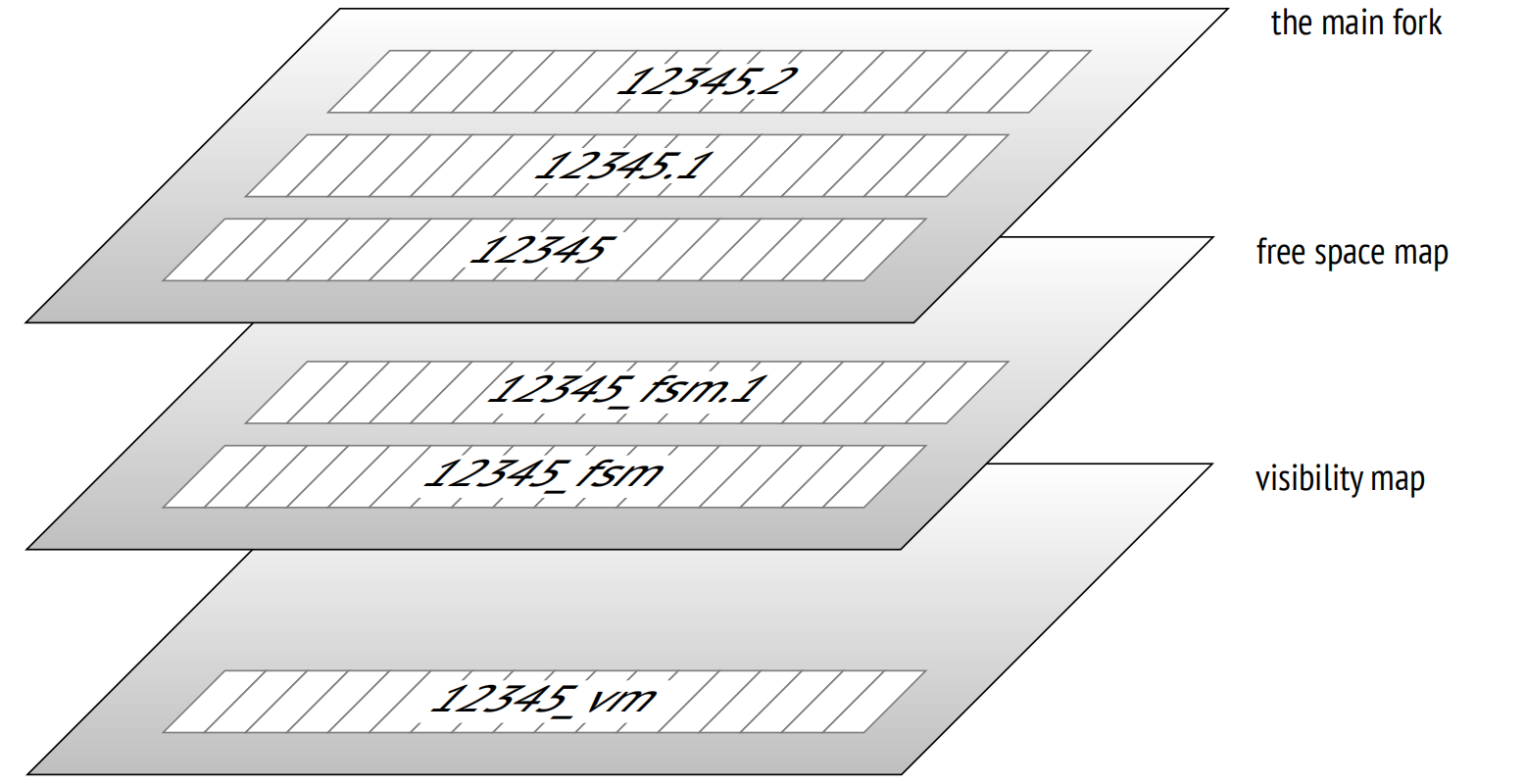
Example:
31069        # table relfilenode, first segment
31069.1      # second segment
31069.2      # third segment
31069_fsm    # fsm file
31069_vm     # vm file
To obtain a relation file’s path, you must specify the branch ForkNumber to access different forks.
typedef enum ForkNumber
{
	InvalidForkNumber = -1,      // invalid
	MAIN_FORKNUM = 0,            // main fork
	FSM_FORKNUM,                 // free space map
	VISIBILITYMAP_FORKNUM,       // visibility map
	INIT_FORKNUM                 // init fork, suffix _init; special, used for unlogged tables.
	                             // When an unlogged table cannot be recovered to a consistent state
	                             // after a crash, the kernel simply deletes all forks of such objects
	                             // during recovery and overwrites the main fork with the init fork
} ForkNumber;
Inside the kernel, reading a relation file requires obtaining its physical path, which is done by the function GetRelationPath.
/*
 * Get a relation file path
 * Parameters:
 *    dbNode:   database OID
 *    spcNode:  tablespace OID
 *    relNode:  relation OID
 *    backendId: backend process ID, used for temp tables
 *    forkNumber: fork number
 * Returns: the relation file path
 */
extern char *GetRelationPath(Oid dbNode, Oid spcNode, Oid relNode,
							 int backendId, ForkNumber forkNumber);
Taking the default tablespace as an example, the naming format is as follows:
- Main fork:
"base/%u/%u", dbNode, relNode - FSM fork: main fork +
_fsm - VM fork: main fork +
_vm - Temp table:
"base/%u/t%d_%u", dbNode, backendId, relNode— temp tables are special; they need the backend process ID and atmarker.
See the
GetRelationPathsource for the detailed naming rules.
How to Locate a Page?
In PostgreSQL, every data page is assigned a unique tag BufferTag, the buffer tag. RelFileNode together with ForkNumber identifies the concrete fork file of a relation, and BlockNumber determines the page offset.
typedef struct buftag
{
	RelFileNode rnode;			/* physical relation identifier */
	ForkNumber	forkNum;
	BlockNumber blockNum;		/* blknum relative to begin of reln */
} BufferTag;
In a heap, each page is 8 KB (default size), and block numbers increase sequentially; when they exceed 1 GB, a new segment is split off.
|             segments 0             |   segments 1 | ... |
| page0 | page 1 | ... | page 131072 | page 131073  | ... |
From this rule, it is easy to locate which segment a block number belongs to, and its offset within that segment.
#define RELSEG_SIZE 131072  // each segment holds at most 131072 pages = 1G/8k
// get the segment number, i.e. which segment file
targetseg = blkno / ((BlockNumber) RELSEG_SIZE);
// get the offset within the segment
seekpos = (off_t) BLCKSZ * (blocknum % ((BlockNumber) RELSEG_SIZE));
When we need to access a page, we can read it into the buffer pool via the function ReadBufferExtended.
extern Buffer ReadBufferExtended(Relation reln, ForkNumber forkNum,
								 BlockNumber blockNum, ReadBufferMode mode,
								 BufferAccessStrategy strategy);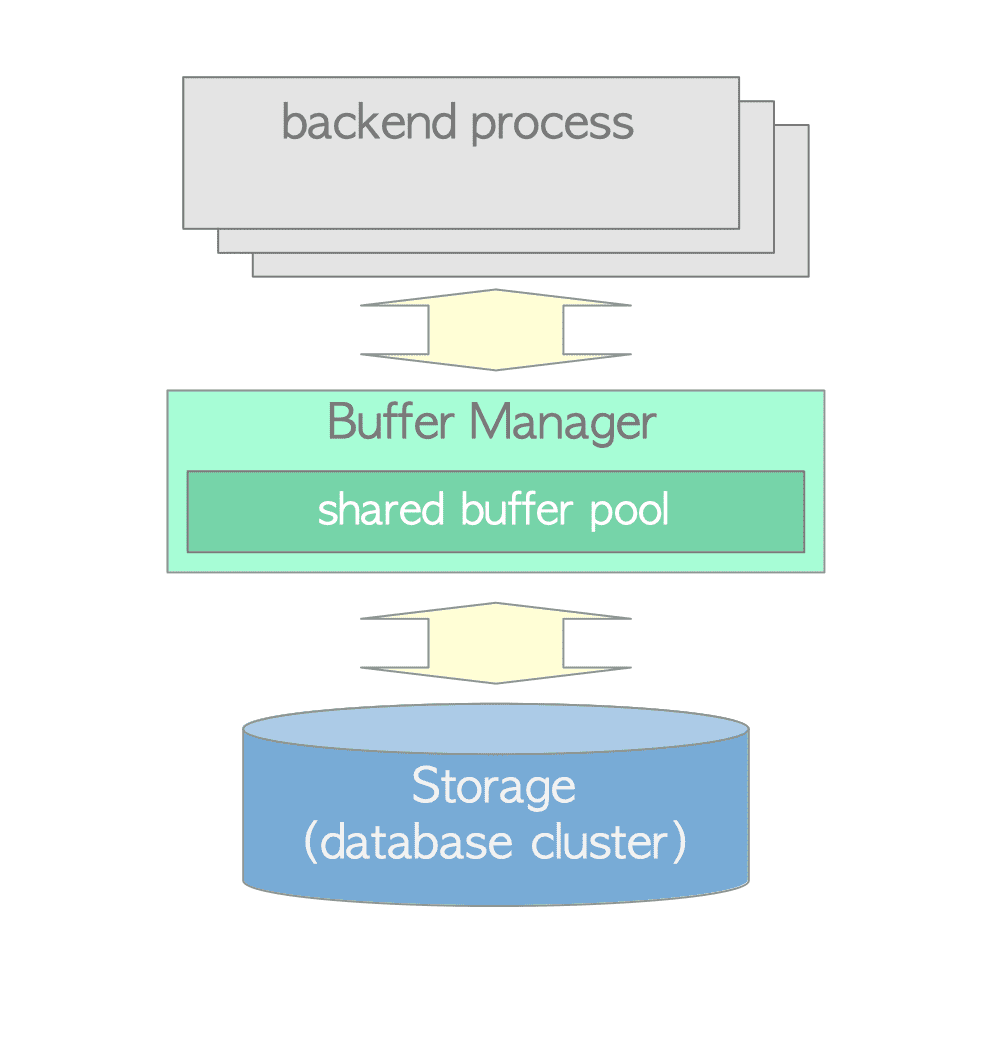
We will not go into the buffer pool here.
When ReadBufferExtended reads a page and it is not found in the buffer pool, the page is fetched by reading the file. The interaction with physical files adds a layer of abstraction in PostgreSQL called the storage manager, smgr. Currently only a “disk” storage manager exists (this does not mean only disk is supported, but rather that any device providing a standard filesystem is supported).
// abstract the read operation
void		(*smgr_read) (SMgrRelation reln, ForkNumber forknum,
							  BlockNumber blocknum, char *buffer);
// the read operation
void smgrread(SMgrRelation reln, ForkNumber forknum, BlockNumber blocknum, char *buffer)
{
    // implemented by a lower layer (e.g. md)
	  smgrsw[reln->smgr_which].smgr_read(reln, forknum, blocknum, buffer);
}
// md implements the concrete file read
extern void mdread(SMgrRelation reln, ForkNumber forknum, BlockNumber blocknum, char *buffer);
Call stack:
heapgetpage    // get the page
  ReadBufferExtended
    ReadBuffer_common
      smgrread
        mdread
          FileRead
            pread   // system call
In cloud-native database implementations, because of the compute-storage separation architecture, this is one of the boundaries between compute and storage. Cloud-native storage handling needs to be implemented here. Another important point is the WAL log. In a sense, from a software-architecture perspective, you can think in terms of stateful vs stateless services: storage is the stateful service, while stateless services usually provide the compute-related logic and can be scaled out relatively easily.
What Is the Maximum Number of Pages a PostgreSQL Table Can Have?
In PostgreSQL, BlockNumber is a 32-bit unsigned integer with a maximum value of 2^32-1; this special value is used to signal ReadBufferExtended to create a new page. The actual maximum is 2^32-2. With each page being 8 KB, the theoretical maximum table size is: (2^32-2) * 8KB = 32T.
typedef uint32 BlockNumber;

#define InvalidBlockNumber		((BlockNumber) 0xFFFFFFFF)
#define MaxBlockNumber			((BlockNumber) 0xFFFFFFFE)  // 2^32 - 2 = 32T
Page Layout
The page layout is shown in the figure below:
It mainly consists of the following parts:
- Page header:
PageHeaderDataoccupies 24 bytes and holds page metadata. - Line pointer array: each line pointer
ItemIdDataoccupies 4 bytes and holds a pointer to a heap tuple, containing <offset, length> information. - Free space: unused page space.
- Heap tuples: the data records themselves, stacked from the bottom of the page in reverse order.
- Special space: the “special space” is used on some index pages; in ordinary tables (non-index) this area is empty. (The special space is a special data area used only by indexes, holding specific data whose content depends on the index type.)
The page layout is as follows:
/*
 * +----------------+---------------------------------+
 * | PageHeaderData | linp1 linp2 linp3 ...           |
 * +-----------+----+---------------------------------+
 * | ... linpN |									  |
 * +-----------+--------------------------------------+
 * |		   ^ pd_lower							  |
 * |												        |
 * |			 v pd_upper							  |
 * +-------------+------------------------------------+
 * |			 | tupleN ...                         |
 * +-------------+------------------+-----------------+
 * |	   ... tuple3 tuple2 tuple1 | "special space" |
 * +--------------------------------+-----------------+
 *									^ pd_special
 */
Page Header
The page header stores the page’s metadata.
typedef struct PageHeaderData
{
	PageXLogRecPtr pd_lsn;		      /* LSN of the XLOG record written for the last change to this page */
	uint16		pd_checksum;	        /* page checksum */
	uint16		pd_flags;		          /* flag bits */
	LocationIndex pd_lower;		      /* start of free space */
	LocationIndex pd_upper;		      /* end of free space */
	LocationIndex pd_special;	      /* start of special space */
	uint16		pd_pagesize_version;  /* page size, page layout version number */
	TransactionId pd_prune_xid;     /* oldest prunable XID on the page, or 0 if none */
	ItemIdData	pd_linp[FLEXIBLE_ARRAY_MEMBER]; /* line pointer array */
} PageHeaderData;

typedef PageHeaderData *PageHeader;
The pd_flags flag bits are as follows:
#define PD_HAS_FREE_LINES	  0x0001	/* are there any unused line pointers? */
#define PD_PAGE_FULL		    0x0002	/* set by UPDATE when the page cannot find enough free space for its new tuple version */
#define PD_ALL_VISIBLE		  0x0004	/* all tuples are visible */
The LSN is used by the buffer manager to enforce the basic WAL rule: “WAL is written before data.” A dirty page must not be flushed to disk until the xlog flush position has passed this page’s LSN.
Line Pointer
The line pointer definition:
typedef struct ItemIdData
{
	unsigned	lp_off:15,		/* offset of the tuple from the start of the page */
				lp_flags:2,		/* status bits */
				lp_len:15;		/* tuple length */
} ItemIdData;

typedef ItemIdData *ItemId;
To get the number of rows within a page, the calculation is: (pd_lower - page header) / line pointer size.
#define PageGetMaxOffsetNumber(page) \
	(((PageHeader) (page))->pd_lower <= SizeOfPageHeaderData ? 0 : \
	 ((((PageHeader) (page))->pd_lower - SizeOfPageHeaderData) \
	  / sizeof(ItemIdData)))
To get the row data from a line pointer:
#define PageGetItem(page, itemId) \
( \
	AssertMacro(PageIsValid(page)), \
	AssertMacro(ItemIdHasStorage(itemId)), \
	(Item)(((char *)(page)) + ItemIdGetOffset(itemId)) \
)