containerd Container Runtime
Introduction to containerd
containerd is an industrial-grade, open-standard container runtime. It has become one of the core components enabled by default in Kubernetes. containerd is a daemon responsible for managing the complete lifecycle of containers. Its core features:
- Compliant with the OCI (Open Container Initiative) standard
- Supports the CRI (Container Runtime Interface) and can be used directly by Kubernetes
- Lightweight, stable, and highly available, designed for production environments
- Excludes high-level features (such as building images or Dockerfile support), focusing solely on “running containers”
+---------------------+
|     Kubernetes      |
|    (via CRI)        |
+----------+----------+
           |
+----------v----------+     +------------------+
|     containerd      |<--->| containerd-shim  |
+----------+----------+     +------------------+
           |
+----------v----------+
|       runc          | ← OCI runtime (actually creates containers)
+---------------------+| Component | Role |
|---|---|
| containerd | The main daemon that exposes a gRPC API and manages images, containers, and tasks |
| containerd-shim | One shim process per container, so containers keep running even if containerd crashes |
| runc | An OCI-compliant low-level runtime that performs syscalls such as unshare, mount, and exec |
| CRI Plugin | Built into containerd; implements the Kubernetes CRI interface (no extra component needed) |
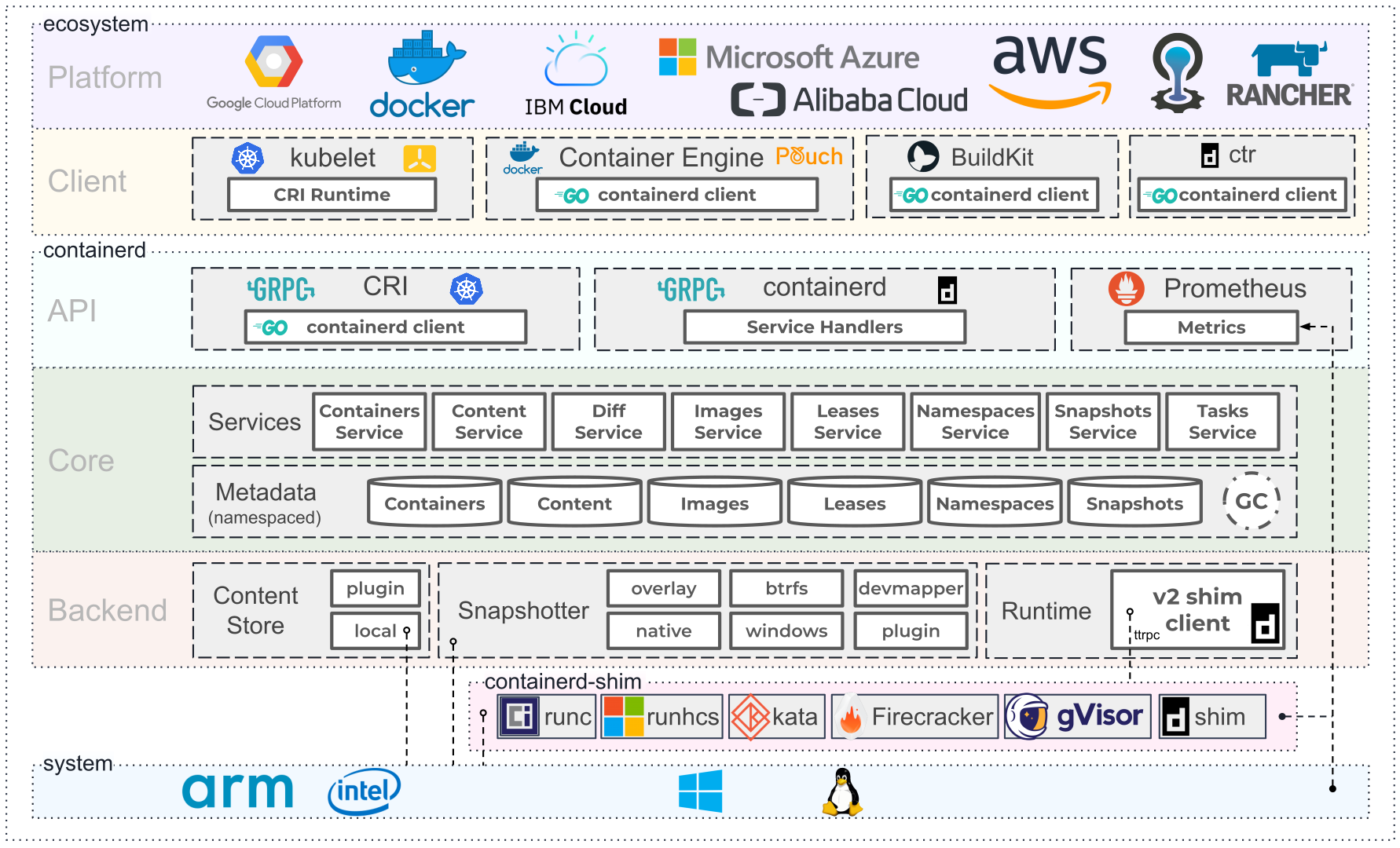
Its place in the ecosystem:
Installing containerd
You can refer to Getting started with containerd for installation instructions. Alternatively, you can install Docker directly, which will install containerd as well. runc is also installed as part of the containerd installation.
sudo apt update
sudo apt install -y containerd
sudo containerd config default | sudo tee /etc/containerd/config.toml
# Make sure SystemdCgroup = true (important for Kubernetes)
sudo sed -i 's/SystemdCgroup = false/SystemdCgroup = true/' /etc/containerd/config.toml
sudo systemctl restart containerd
After installation, you can check the version with the ctr command-line tool:
root@node2:~# ctr --version
ctr github.com/containerd/containerd 1.7.28
containerd command-line tools:
| Name | Community | API | Target | Web site |
|---|---|---|---|---|
ctr | containerd | Native | For debugging only | (None, see ctr --help for usage) |
nerdctl | containerd (non-core) | Native | General-purpose | https://github.com/containerd/nerdctl |
crictl | Kubernetes SIG-node | CRI | For debugging only | https://github.com/kubernetes-sigs/cri-tools/blob/master/docs/crictl.md |
containerd’s configuration file is /etc/containerd/config.toml. You can generate the default configuration file with the command containerd config default > /etc/containerd/config.toml.